Gaming Mice

Budget, wireless, lightweight and feature-rich gaming mice compared for different players and budgets.

Quick buying guide

A practical starting point for gaming mice

Typical UK price range: £20–£120+Indicative market guide reviewed August 2026. International pricing, tax, availability and subscriptions vary by region.

Start with shape and grip comfort, then sensor consistency and connection quality. Competitive players often value low weight and low-latency wireless; general players may get more value from extra buttons, battery life and a comfortable shape.

Common search themes:best gaming mousebudget gaming mousewireless gaming mouselightweight gaming mouse
Products worth comparing

Shortlist at a glance

These are research-led starting points chosen to represent useful budgets and use cases. A product appearing here is not a claim that we have personally tested it; hands-on experience is labelled separately in detailed reviews.

Gaming Mice shortlist comparison
Product / serviceOur shortlist roleIndicative priceBest for
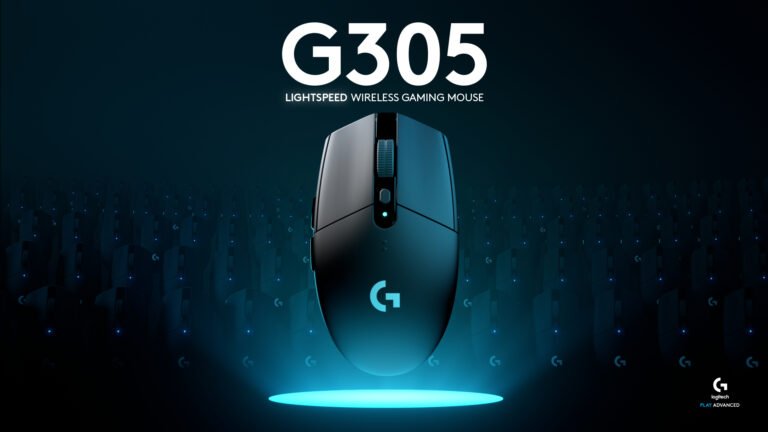
Logitech G305 LIGHTSPEEDBest overall value£30–£45Affordable wireless gaming with proven battery life
Logitech G203 LIGHTSYNCBest low-cost wired£20–£30First gaming mouse or simple wired setup
Razer CobraBest lightweight wired£30–£45Fast-paced games and smaller/lighter setups
Razer Basilisk V3Feature-rich pick£45–£70Extra buttons, scrolling and mixed gaming/productivity use

Best overall value

Logitech G305 LIGHTSPEED

Indicative price: £30–£45

Product-specific evidence · sources checked 25 August 2026

A long-running wireless favourite that balances reliable gaming performance, simple controls and sensible UK pricing.

Best for: Affordable wireless gaming with proven battery life

Potential drawback: Uses an AA battery and is not especially light

Research assessment

The evidence remains unusually consistent for an older budget mouse: the HERO sensor and LIGHTSPEED receiver provide dependable gaming performance, while one AA cell gives long service without a charging cable. Its simplicity is the attraction, but it is no longer lightweight by modern standards and it offers neither Bluetooth nor a wired fallback. The compact, fairly flat shell is also much safer for small-to-medium hands than for a large palm grip.

Reasons to consider
  • Reliable low-latency wireless and accurate tracking for the price
  • Long quoted battery life with receiver storage inside the mouse
Limitations and checks
  • AA-powered 99g design feels heavy beside modern ultralight rivals
  • No Bluetooth or wired mode, and the compact shape will not fit every hand
Sources and evidence notes (3)

This editorial synthesis does not represent a hands-on test by The Tools and Tech. Source links are references, not affiliate links. Research depth: Official product information plus multiple product-specific independent sources.

  1. Logitech G305 product information (opens in a new tab) (manufacturer)
  2. Tom's Hardware G305 review (opens in a new tab) (independent review)
  3. Tom's Guide G305 review (opens in a new tab) (independent review)

Price and availability can change. Check the retailer for the latest information.

Best low-cost wired

Logitech G203 LIGHTSYNC

Indicative price: £20–£30

Product-specific evidence · sources checked 25 August 2026

A straightforward wired option with six buttons, RGB and Logitech software support at an accessible price.

Best for: First gaming mouse or simple wired setup

Potential drawback: Basic shape and feature set

Research assessment

The G203 is a sensible first wired gaming mouse rather than a cut-price enthusiast model. Independent testing supports its responsive main clicks, usable 8,000-DPI sensor and straightforward six-button layout, and G Hub adds remapping and lighting control. The compromise is physical rather than numerical: the low, simple shell, rubber cable and basic glide feel dated beside newer lightweight designs. It is most convincing when priced clearly below the Razer Cobra and budget wireless alternatives.

Reasons to consider
  • Clean basic tracking, sharp clicks and six programmable controls
  • Low entry price with mature Logitech software support
Limitations and checks
  • Flat compact shape and plain rubber cable reduce comfort and freedom for some users
  • Little reason to pay extra for it when newer lightweight rivals are close in price
Sources and evidence notes (3)

This editorial synthesis does not represent a hands-on test by The Tools and Tech. Source links are references, not affiliate links. Research depth: Official product information plus multiple product-specific independent sources.

  1. Logitech G203 product information (opens in a new tab) (manufacturer)
  2. Tom's Hardware G203 LIGHTSYNC review (opens in a new tab) (independent review)
  3. Jeuxvideo G203 LIGHTSYNC test (opens in a new tab) (independent review)

Price and availability can change. Check the retailer for the latest information.

Best lightweight wired

Razer Cobra

Indicative price: £30–£45

Product-specific evidence · sources checked 25 August 2026

A compact lightweight wired mouse that prioritises quick movement and uncomplicated gaming performance.

Best for: Fast-paced games and smaller/lighter setups

Potential drawback: Wired only

Research assessment

The wired Cobra makes a strong case for buyers who prioritise low weight and response over wireless convenience. Razer lists a 58g compact symmetrical shell, and RTINGS measured excellent click latency and sensor behaviour for its price. Its small, low profile is particularly suited to fingertip or claw grip with small-to-medium hands. The trade-offs are modest body flex, only two side buttons and a cable that, although flexible, is still a cable.

Reasons to consider
  • Very light compact design with strong measured click and sensor performance
  • Optical switches, onboard profile and useful software remapping at a budget price
Limitations and checks
  • Small right-handed side-button layout is a poor fit for some hands and left-handed use
  • Minor shell flex and limited controls make it less versatile than heavier feature-led mice
Sources and evidence notes (3)

This editorial synthesis does not represent a hands-on test by The Tools and Tech. Source links are references, not affiliate links. Research depth: Official product information plus multiple product-specific independent sources.

  1. Razer Cobra product information (opens in a new tab) (manufacturer)
  2. RTINGS Razer Cobra review (opens in a new tab) (independent test)
  3. RTINGS 2026 Razer mouse comparison (opens in a new tab) (independent comparison)

Price and availability can change. Check the retailer for the latest information.

Feature-rich pick

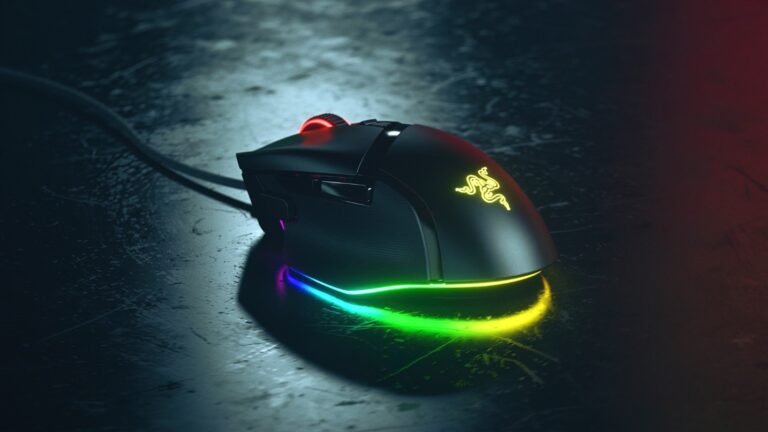
Razer Basilisk V3

Indicative price: £45–£70

Product-specific evidence · sources checked 25 August 2026

A larger right-handed mouse with extra controls and a versatile scroll wheel for players who value features over minimum weight.

Best for: Extra buttons, scrolling and mixed gaming/productivity use

Potential drawback: Heavier than ultralight esports mice

Research assessment

The Basilisk V3 is the feature-led alternative to an ultralight FPS mouse. Its right-handed thumb support, plentiful programmable inputs and tactile/free-spin tilt wheel work well across strategy games, MMOs and office tasks, while independent testing found the Focus+ sensor responsive and accurate. The cost of that versatility is weight and size: at roughly 94–101g depending on measurement, it is noticeably slower to throw around than current esports designs, and the busy wheel can sound and feel clunky.

Reasons to consider
  • Excellent control set and unusually versatile multi-mode scroll wheel
  • Comfortable right-handed shape with dependable sensor performance
Limitations and checks
  • Heavy for competitive FPS play and unsuitable for left-handed users
  • Wired-only design and a wheel some reviewers found noisy or clunky
Sources and evidence notes (3)

This editorial synthesis does not represent a hands-on test by The Tools and Tech. Source links are references, not affiliate links. Research depth: Official product information plus multiple product-specific independent sources.

  1. Razer Basilisk V3 product information (opens in a new tab) (manufacturer)
  2. Tom's Hardware Basilisk V3 review (opens in a new tab) (independent review)
  3. Tom's Guide Basilisk V3 review (opens in a new tab) (independent review)

Price and availability can change. Check the retailer for the latest information.
Use the retailer or official-site button to check the latest price, availability and specifications before buying. Where we later obtain approved affiliate relationships, qualifying links may earn a commission at no extra cost to the reader.

Buying advice

What matters when choosing gaming mice

Sensor performance and consistency
Shape, size and grip style
Weight and button layout
Wired versus wireless value

Our guides focus on the factors that affect real-world fit and value, not simply the longest specification list.

Common questions

Gaming Mice FAQ

How much should I spend on gaming mice?

A useful UK market guide is £20–£120+. The right spend depends on the features you will genuinely use, so compare the middle of the range before paying for premium extras.

What should I look for when buying gaming mice?

Prioritise Sensor performance and consistency, Shape, size and grip style, Weight and button layout. Check compatibility and return/warranty terms before buying, particularly when a product is part of a wider hardware ecosystem.

Are the products on this page hands-on tested?

Not necessarily. This category page is a research-led shortlist. Detailed guides clearly label any hands-on testing and distinguish it from manufacturer specifications, independent evidence and market research.

What is a good gaming mice option to start comparing?

Logitech G305 LIGHTSPEED is one of the current research starting points on this page. Compare it with the alternatives above for budget, compatibility, features and drawbacks before deciding.

Latest Gaming Mice Guides

Research-ledEvidence and decision criteria come before affiliate links.
Clear testing labelsWe identify hands-on experience instead of implying it.
Editorial independenceCommercial relationships do not buy a recommendation.

Review methodology · How we make money · Work with us

The Tools and Tech
Logo