
Gaming Keyboards

Mechanical, membrane, compact and wireless gaming keyboards for competitive play and everyday use.

Quick buying guide

A practical starting point for gaming keyboards

Typical UK price range: £35–£220+Indicative market guide reviewed August 2026. International pricing, tax, availability and subscriptions vary by region.

Choose the layout first, then switch technology and latency. Hall-effect boards can offer adjustable actuation and rapid-trigger features, while traditional mechanical boards may provide broader switch choice, easier repair and a more familiar typing feel.

Common search themes:best gaming keyboardbest budget gaming keyboardHall effect keyboardwireless gaming keyboard
Products worth comparing

Shortlist at a glance

These are research-led starting points chosen to represent useful budgets and use cases. A product appearing here is not a claim that we have personally tested it; hands-on experience is labelled separately in detailed reviews.

Gaming Keyboards shortlist comparison
Product / serviceOur shortlist roleIndicative priceBest for
Wooting 80HEBest performance£180–£210Competitive gaming and adjustable actuation
Keychron K2 HEBest value Hall effect£100–£140Gaming plus everyday typing
Razer Huntsman V3 Pro TKLBest mainstream premium£180–£220Esports-style play with analogue optical switches
Corsair K65 Plus WirelessBest wireless all-rounder£120–£160Clean desk setups and mixed gaming/work use

Best performance

Wooting 80HE

Indicative price: £180–£210

Product-specific evidence · sources checked 25 August 2026

A performance-led Hall-effect keyboard built around rapid input tuning and a compact 80% layout.

Best for: Competitive gaming and adjustable actuation

Potential drawback: Premium price and wired-first focus

Research assessment

The 80HE is the performance reference in this shortlist because its Hall-effect hardware is matched by unusually mature configuration software. Wooting documents true 8kHz scanning and polling, per-key actuation, Rapid Trigger and onboard profiles; independent reviews also praise Wootility, repair-friendly construction and a much-improved typing feel. It remains an expensive wired specialist, however, and some SOCD-style features are restricted in particular competitive games, so buyers must check game rules rather than assuming every function is permitted.

Reasons to consider
  • Exceptionally deep, approachable Hall-effect tuning with true 8kHz operation
  • Strong repairability, replaceable parts and a four-year hardware warranty
Limitations and checks
  • Premium price and no wireless connection
  • Advanced input-priority features may be disallowed by individual games or tournaments
Sources and evidence notes (3)

This editorial synthesis does not represent a hands-on test by The Tools and Tech. Source links are references, not affiliate links. Research depth: Official product information plus multiple product-specific independent sources.

  1. Wooting 80HE specifications (opens in a new tab) (manufacturer)
  2. WIRED Wooting 80HE review (opens in a new tab) (independent review)
  3. Valve response to SOCD keyboard features (opens in a new tab) (independent reporting)

Price and availability can change. Check the retailer for the latest information.

Best value Hall effect

Keychron K2 HE

Indicative price: £100–£140

Product-specific evidence · sources checked 25 August 2026

A compact Hall-effect board that mixes gaming features with the build and typing focus Keychron is known for.

Best for: Gaming plus everyday typing

Potential drawback: 75% layout may not suit number-pad users

Research assessment

The K2 HE is the more balanced gaming-and-work choice: a 75% layout, Hall-effect adjustment, 2.4GHz wireless, Bluetooth and USB-C coexist with damped construction and a restrained office-friendly design. Reviewers consistently praise its smooth, quiet typing and useful web configurator. It is not simply a wireless Wooting, though: competitive polling tops out lower, there is no dedicated media dial, the case is tall, and its hot-swap compatibility is limited to Keychron-supported double-rail magnetic switches.

Reasons to consider
  • Good typing acoustics and build alongside adjustable Hall-effect gaming features
  • Three connection modes and practical multi-device support
Limitations and checks
  • High front height, no rotary control and no number pad
  • Magnetic switch compatibility is narrower than standard MX hot-swap ecosystems
Sources and evidence notes (3)

This editorial synthesis does not represent a hands-on test by The Tools and Tech. Source links are references, not affiliate links. Research depth: Official product information plus multiple product-specific independent sources.

  1. Keychron K2 HE specifications (opens in a new tab) (manufacturer)
  2. PCWorld Keychron K2 HE review (opens in a new tab) (independent review)
  3. CHIP Keychron K2 HE review (opens in a new tab) (independent review)

Price and availability can change. Check the retailer for the latest information.

Best mainstream premium

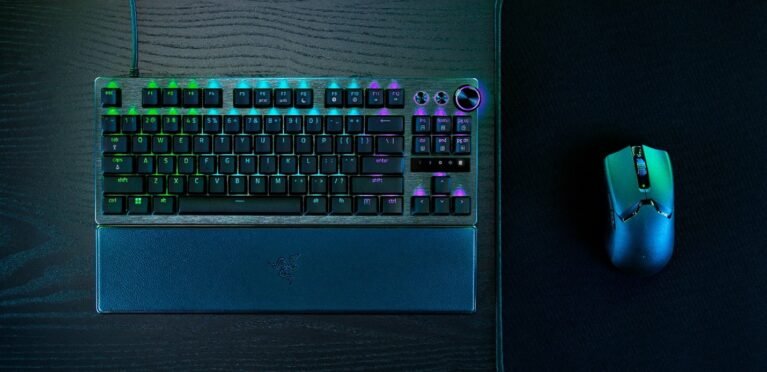
Razer Huntsman V3 Pro TKL

Indicative price: £180–£220

Product-specific evidence · sources checked 25 August 2026

A premium gaming keyboard with adjustable actuation aimed at players who prioritise responsiveness and software control.

Best for: Esports-style play with analogue optical switches

Potential drawback: Expensive for a tenkeyless board

Research assessment

Razer’s analogue optical TKL is a serious esports alternative to Wooting, with adjustable actuation, Rapid Trigger, onboard adjustment and useful physical media controls. Independent reviewers found it responsive, well built and surprisingly capable for normal typing once configured. The decision turns on value and software: it costs a great deal for a wired tenkeyless board, Synapse is comparatively heavy, and gamepad or opposing-key features depend on game support and competitive rules.

Reasons to consider
  • Fast adjustable optical switches with useful on-board controls
  • Solid aluminium-topped build, PBT keycaps and included wrist rest
Limitations and checks
  • High price and bulky companion software
  • Analogue/gamepad functions are game-dependent and some input-priority modes face competitive restrictions
Sources and evidence notes (3)

This editorial synthesis does not represent a hands-on test by The Tools and Tech. Source links are references, not affiliate links. Research depth: Official product information plus multiple product-specific independent sources.

  1. Razer Huntsman V3 Pro TKL product information (opens in a new tab) (manufacturer)
  2. Tom's Hardware Huntsman V3 Pro TKL review (opens in a new tab) (independent review)
  3. Valve response to SOCD keyboard features (opens in a new tab) (independent reporting)

Price and availability can change. Check the retailer for the latest information.
Best wireless all-rounder

Corsair K65 Plus Wireless

Indicative price: £120–£160

Product-specific evidence · sources checked 25 August 2026

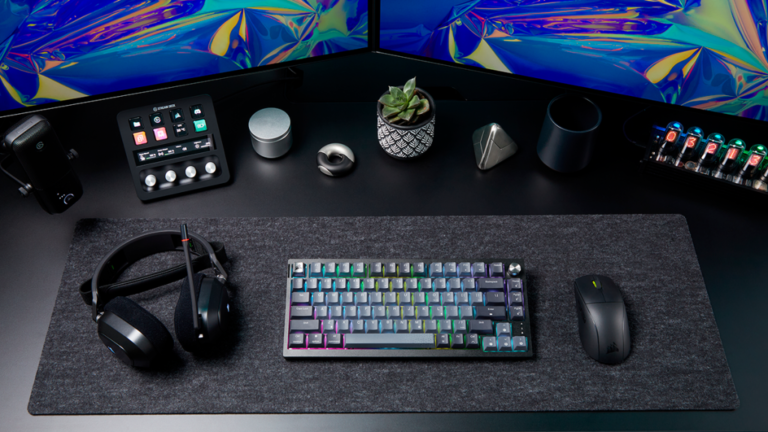
A compact wireless mechanical option with a more conventional typing feel than many pure esports boards.

Best for: Clean desk setups and mixed gaming/work use

Potential drawback: 75% layout drops dedicated number pad

Research assessment

The K65 Plus Wireless is easier to recommend as an all-round compact mechanical keyboard than as an esports specialist. Its 75% layout retains navigation keys and a dial, while dampening, pre-lubed switches and hot-swap sockets produce a more refined feel than many mainstream gaming boards. It also offers wired, 2.4GHz and Bluetooth operation. The plastic chassis does not feel as premium as the price suggests, full lighting control is more restricted away from a cable, and buyers should update firmware cautiously and keep proof of purchase.

Reasons to consider
  • Smooth damped typing, hot-swap switches and a useful multifunction dial
  • Flexible tri-mode connection in a space-efficient 75% layout
Limitations and checks
  • Mostly plastic construction and few truly distinctive performance features
  • Some lighting controls depend on wired iCUE operation; firmware reliability should be checked
Sources and evidence notes (3)

This editorial synthesis does not represent a hands-on test by The Tools and Tech. Source links are references, not affiliate links. Research depth: Official product information plus multiple product-specific independent sources.

  1. Corsair K65 Plus Wireless product information (opens in a new tab) (manufacturer)
  2. Tom's Hardware K65 Plus Wireless review (opens in a new tab) (independent review)
  3. Tom's Guide K65 Plus Wireless review (opens in a new tab) (independent review)

Price and availability can change. Check the retailer for the latest information.
Use the retailer or official-site button to check the latest price, availability and specifications before buying. Where we later obtain approved affiliate relationships, qualifying links may earn a commission at no extra cost to the reader.

Buying advice

What matters when choosing gaming keyboards

Switch feel and latency
Layout and desk space
Wired or wireless connection
Build quality and software

Our guides focus on the factors that affect real-world fit and value, not simply the longest specification list.

Common questions

Gaming Keyboards FAQ

How much should I spend on gaming keyboards?

A useful UK market guide is £35–£220+. The right spend depends on the features you will genuinely use, so compare the middle of the range before paying for premium extras.

What should I look for when buying gaming keyboards?

Prioritise Switch feel and latency, Layout and desk space, Wired or wireless connection. Check compatibility and return/warranty terms before buying, particularly when a product is part of a wider hardware ecosystem.

Are the products on this page hands-on tested?

Not necessarily. This category page is a research-led shortlist. Detailed guides clearly label any hands-on testing and distinguish it from manufacturer specifications, independent evidence and market research.

What is a good gaming keyboards option to start comparing?

Wooting 80HE is one of the current research starting points on this page. Compare it with the alternatives above for budget, compatibility, features and drawbacks before deciding.

Research-ledEvidence and decision criteria come before affiliate links.
Clear testing labelsWe identify hands-on experience instead of implying it.
Editorial independenceCommercial relationships do not buy a recommendation.

Review methodology · How we make money · Work with us

The Tools and Tech
Logo