Docking Stations

Quick buying guide

A practical starting point for docking stations

Typical UK price range: £120–£400+Indicative market guide reviewed August 2026. International pricing, tax, availability and subscriptions vary by region.

Start with the laptop: operating system, USB4/Thunderbolt support, charging requirement and the number/resolution of displays it can actually drive. A dock cannot bypass limits built into the computer.

Products worth comparing

Shortlist at a glance

These are research-led starting points chosen to represent useful budgets and use cases. A product appearing here is not a claim that we have personally tested it; hands-on experience is labelled separately in detailed reviews.

Docking Stations shortlist comparison
Product / serviceOur shortlist roleIndicative priceBest for
Anker 778 Thunderbolt Docking StationBest value multiport£250–£320High-port-count laptop desks
CalDigit TS4Best premium Thunderbolt 4£350–£400Power users with many peripherals
Dell WD22TB4Best business fleet option£250–£350Dell-centric offices and replaceable modules
CalDigit TS5Best Thunderbolt 5 upgradeAbout £380–£420Thunderbolt 5 laptops needing high charging power and several fast downstream connections

Best value multiport

Anker 778 Thunderbolt Docking Station

Indicative price: £250–£320

Category-supported evidence · sources checked 17 September 2026

A feature-heavy Thunderbolt dock for users who need displays, Ethernet, USB and charging from one desktop hub.

Best for: High-port-count laptop desks

Potential drawback: Large power brick and premium price

Research assessment

A feature-heavy Thunderbolt dock for users who need displays, Ethernet, USB and charging from one desktop hub. Key compromise: Large power brick and premium price.

Limitations and checks
  • Large power brick and premium price.
  • Display support varies by laptop chipset and operating system; verify host bandwidth, power delivery and every required port.
Sources and evidence notes (2)

This editorial synthesis does not represent a hands-on test by The Tools and Tech. Source links are references, not affiliate links. Research depth: Official product information plus independent category context.

  1. Anker official product catalogue (opens in a new tab) (manufacturer or official source)
  2. Wirecutter Thunderbolt-dock guide (opens in a new tab) (independent category context)

Price and availability can change. Check the retailer for the latest information.
Best premium Thunderbolt 4

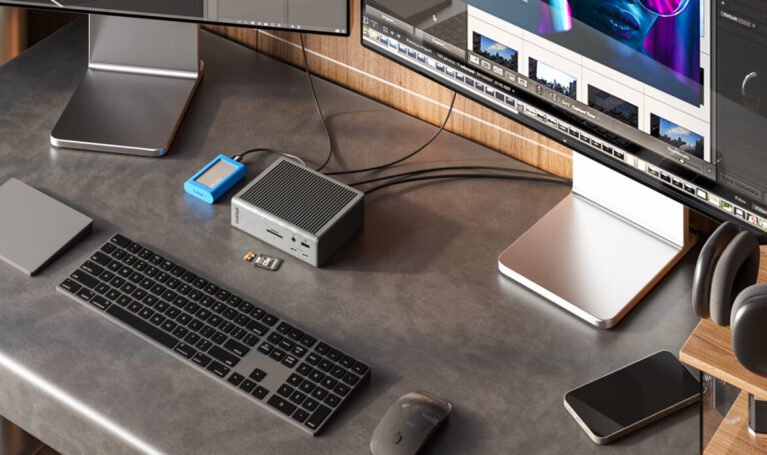
CalDigit TS4 Thunderbolt 4 dock with laptop and connected accessories
Product image: CalDigit Press & Media Resources · Image: CalDigit

CalDigit TS4

Indicative price: £350–£400

Category-supported evidence · sources checked 17 September 2026

A high-end dock with extensive connectivity and strong power delivery for dense professional setups.

Best for: Power users with many peripherals

Potential drawback: Expensive if you only need one monitor and a few USB ports

Research assessment

A high-end dock with extensive connectivity and strong power delivery for dense professional setups. Key compromise: Expensive if you only need one monitor and a few USB ports.

Limitations and checks
  • Expensive if you only need one monitor and a few USB ports.
  • Display support varies by laptop chipset and operating system; verify host bandwidth, power delivery and every required port.
Sources and evidence notes (2)

This editorial synthesis does not represent a hands-on test by The Tools and Tech. Source links are references, not affiliate links. Research depth: Official product information plus independent category context.

  1. CalDigit official product catalogue (opens in a new tab) (manufacturer or official source)
  2. Wirecutter Thunderbolt-dock guide (opens in a new tab) (independent category context)

Price and availability can change. Check the retailer for the latest information.

Best business fleet option

Dell WD22TB4 product photograph
Product image: Back to the Office / Awin product feed · Product photo: Back to the Office via Awin

Dell WD22TB4

Indicative price: £250–£350

Category-supported evidence · sources checked 17 September 2026

A business-oriented Thunderbolt dock designed for reliable desk connectivity and serviceable deployment.

Best for: Dell-centric offices and replaceable modules

Potential drawback: Best experience is with supported Dell systems

Research assessment

A business-oriented Thunderbolt dock designed for reliable desk connectivity and serviceable deployment. Key compromise: Best experience is with supported Dell systems.

Limitations and checks
  • Best experience is with supported Dell systems.
  • Display support varies by laptop chipset and operating system; verify host bandwidth, power delivery and every required port.
Sources and evidence notes (2)

This editorial synthesis does not represent a hands-on test by The Tools and Tech. Source links are references, not affiliate links. Research depth: Official product information plus independent category context.

  1. Dell official product catalogue (opens in a new tab) (manufacturer or official source)
  2. Wirecutter Thunderbolt-dock guide (opens in a new tab) (independent category context)

Price and availability can change. Check the retailer for the latest information.
Best Thunderbolt 5 upgrade

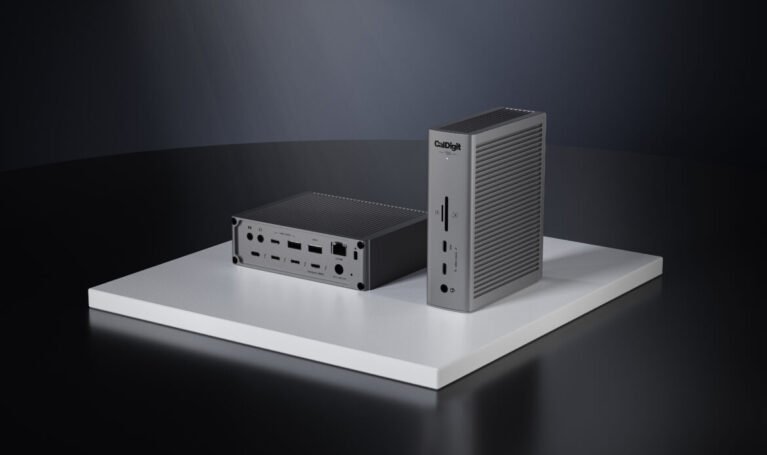
CalDigit TS5 Thunderbolt 5 dock shown with connected desktop accessories
Product image: CalDigit Press & Media Resources · Image: CalDigit

CalDigit TS5

Indicative price: About £380–£420

Product-specific evidence · sources checked 17 September 2026

A 15-port Thunderbolt 5 dock with up to 140W host charging; display support still depends on the connected computer and operating system.

Best for: Thunderbolt 5 laptops needing high charging power and several fast downstream connections

Potential drawback: High price and reduced functionality on older hosts

Research assessment

TS5 is a forward-looking dock for a computer that can genuinely use Thunderbolt 5 bandwidth and 140W charging. Its 15 ports include several downstream Thunderbolt connections, fast USB, card readers and 2.5Gb Ethernet, making it a cleaner fit for modern high-bandwidth peripherals than a legacy-port-heavy dock. The host remains the limit: older Thunderbolt and USB-C systems lose bandwidth, charging or display options, and operating-system display rules still apply. It is poor value if the laptop only needs one screen and a few ordinary USB devices.

Reasons to consider
  • High-bandwidth downstream expansion, useful card readers and up to 140W host charging
  • Strong fit for current professional laptops with several fast storage or display devices
Limitations and checks
  • Premium price and little benefit when the host lacks Thunderbolt 5
  • Display count and resolution remain dependent on the exact computer and operating system
Sources and evidence notes (3)

This editorial synthesis does not represent a hands-on test by The Tools and Tech. Source links are references, not affiliate links. Research depth: Official product information plus product-specific independent review and reporting.

  1. CalDigit TS5 official information (opens in a new tab) (manufacturer)
  2. Macworld CalDigit TS5 review (opens in a new tab) (independent review)
  3. The Verge TS5 launch and availability report (opens in a new tab) (independent reporting)

Price and availability can change. Check the retailer for the latest information.

Use the retailer or official-site button to check the latest price, availability and specifications before buying. Where we later obtain approved affiliate relationships, qualifying links may earn a commission at no extra cost to the reader.

Buying advice

What matters when choosing docking stations

Laptop and OS compatibility
Display support
Power delivery
USB, Ethernet and storage ports

Our guides focus on the factors that affect real-world fit and value, not simply the longest specification list.

Common questions

Docking Stations FAQ

How much should I spend on docking stations?

A useful UK market guide is £120–£400+. The right spend depends on the features you will genuinely use, so compare the middle of the range before paying for premium extras.

What should I look for when buying docking stations?

Prioritise Laptop and OS compatibility, Display support, Power delivery. Check compatibility and return/warranty terms before buying, particularly when a product is part of a wider hardware ecosystem.

Are the products on this page hands-on tested?

Not necessarily. This category page is a research-led shortlist. Detailed guides clearly label any hands-on testing and distinguish it from manufacturer specifications, independent evidence and market research.

What is a good docking stations option to start comparing?

Anker 778 Thunderbolt Docking Station is one of the current research starting points on this page. Compare it with the alternatives above for budget, compatibility, features and drawbacks before deciding.

Latest Docking Stations Guides

Research-ledEvidence and decision criteria come before affiliate links.
Clear testing labelsWe identify hands-on experience instead of implying it.
Editorial independenceCommercial relationships do not buy a recommendation.

Review methodology · How we make money · Work with us

Accessories and compatible extras

Choose accessories by the exact device model and manufacturer instructions. These are buying research links, not confirmed affiliate links or verified individual product listings; retailer links are store starting points.

AccessoryBefore buyingAmazon UKUK retailer
Certified USB-C/Thunderbolt cablesData, display and charging capabilityAmazon UK searchBrowse UK retailer
Display cables and adaptersDock video-output limitationsAmazon UK searchBrowse UK retailer

For manufacturer-specific spares, prioritise the original manufacturer or an authorised reseller. Check seller, delivery and suitability before purchase.

The Tools and Tech
Logo