A practical starting point for business media & meeting rooms
Typical UK price range: About £1,500–£8,000+ per room before displays and installationIndicative market guide reviewed August 2026. International pricing, tax, availability and subscriptions vary by region.
Design around room size, seating, supported meeting platform, microphone reach, display count, device management and support ownership. Certified hardware reduces compatibility risk, but licences, cabling, acoustic treatment, installation and replacement planning still determine total cost.
These are research-led starting points chosen to represent useful budgets and use cases. A product appearing here is not a claim that we have personally tested it; hands-on experience is labelled separately in detailed reviews.
Business Media & Meeting Rooms shortlist comparison
Product / service
Our shortlist role
Indicative price
Best for
Logitech Rally Bar
Best established medium-room video bar
About £2,500–£3,500 plus controller/licensing
Teams or Zoom rooms needing a well-supported appliance or USB mode
HP Poly Studio X52
Best compact enterprise video bar
About £2,000–£3,000 before controller/licensing
Small-to-medium rooms managed in a Poly or HP estate
Neat Bar 2
Best clean premium room appliance
Premium meeting-room tier
Teams and Zoom rooms prioritising a simple integrated experience
Cisco Room Bar Pro
Best for Cisco-managed collaboration estates
Enterprise quote
Larger rooms using Webex and enterprise device management
BrightSign XC5 series
Best high-end digital signage player
Commercial quote
Multi-screen signage, video walls and demanding 4K/8K presentations
Best established medium-room video bar
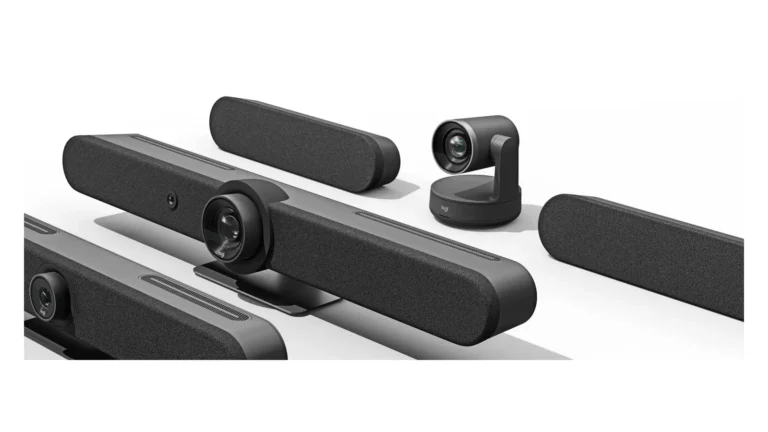
Product image: Logitech Newsroom / Business Wire — Rally family launch press image · Image courtesy of Logitech
Logitech Rally Bar
Indicative price: About £2,500–£3,500 plus controller/licensing
Product-specific evidence · sources checked 28 August 2026
Rally Bar is an all-in-one camera, microphone and speaker system for medium meeting rooms with appliance and USB deployment options.
Best for: Teams or Zoom rooms needing a well-supported appliance or USB mode
Potential drawback: Room controller, licence and expansion microphones add cost
Research assessment
Rally Bar is an all-in-one camera, microphone and speaker system for medium meeting rooms with appliance and USB deployment options. It is most relevant for teams or zoom rooms needing a well-supported appliance or usb mode. The strongest evidence-led reasons to consider it are broad platform certification and established room-device ecosystem and appliance and usb modes give deployment flexibility. Buyers should still account for exact bundle may omit the touch controller or room-compute licence and large or acoustically difficult rooms may need extra microphones and professional design.
Reasons to consider
Broad platform certification and established room-device ecosystem
Appliance and USB modes give deployment flexibility
Limitations and checks
Exact bundle may omit the touch controller or room-compute licence
Large or acoustically difficult rooms may need extra microphones and professional design
Sources and evidence notes (2)
This editorial synthesis does not represent a hands-on test by The Tools and Tech. Source links are references, not affiliate links. Research depth: Product-specific evidence; exact official information plus separately labelled external evidence or category context.
Price and availability can change. Check the retailer for the latest information.
Best compact enterprise video bar
Product image: Back to the Office / Awin product feed · Photo: Back to the Office / Awin. Poly Studio X52 8D8K2AA shown from the rear with mounting bracket; controller and licences depend on the purchased package.
HP Poly Studio X52
Indicative price: About £2,000–£3,000 before controller/licensing
Product-specific evidence · sources checked 28 August 2026
Studio X52 is an Android-based all-in-one video bar with camera framing, microphones, speakers and supported meeting-app modes.
Best for: Small-to-medium rooms managed in a Poly or HP estate
Potential drawback: Platform mode and accessory compatibility require exact checking
Research assessment
Studio X52 is an Android-based all-in-one video bar with camera framing, microphones, speakers and supported meeting-app modes. It is most relevant for small-to-medium rooms managed in a poly or hp estate. The strongest evidence-led reasons to consider it are integrated appliance reduces separate room-compute hardware and enterprise management and poly audio heritage suit managed estates. Buyers should still account for certification and available app modes can change by firmware and controller, licence and room-size fit are separate purchase decisions.
Reasons to consider
Integrated appliance reduces separate room-compute hardware
Enterprise management and Poly audio heritage suit managed estates
Limitations and checks
Certification and available app modes can change by firmware
Controller, licence and room-size fit are separate purchase decisions
Sources and evidence notes (2)
This editorial synthesis does not represent a hands-on test by The Tools and Tech. Source links are references, not affiliate links. Research depth: Product-specific evidence; exact official information plus separately labelled external evidence or category context.
Price and availability can change. Check the retailer for the latest information.
Best clean premium room appliance
Product image: Back to the Office / Awin product feed · Product photo: Back to the Office via Awin. Neat Bar Generation 2 shown with Neat Pad; included controller and licences depend on purchased package.
Neat Bar 2
Indicative price: Premium meeting-room tier
Early or evolving evidence · sources checked 28 August 2026
Neat Bar 2 is a compact meeting-room appliance designed around supported Zoom and Microsoft Teams experiences with optional Neat controllers.
Best for: Teams and Zoom rooms prioritising a simple integrated experience
Potential drawback: Proprietary room ecosystem and premium deployment cost
Research assessment
Neat Bar 2 is a compact meeting-room appliance designed around supported Zoom and Microsoft Teams experiences with optional Neat controllers. It is most relevant for teams and zoom rooms prioritising a simple integrated experience. The strongest evidence-led reasons to consider it are purpose-built hardware and simplified cable layout and strong automatic framing and room-experience focus. Buyers should still account for best value depends on supported platform certification and licences and expansion, service and replacement choices are tied to the neat ecosystem.
Reasons to consider
Purpose-built hardware and simplified cable layout
Strong automatic framing and room-experience focus
Limitations and checks
Best value depends on supported platform certification and licences
Expansion, service and replacement choices are tied to the Neat ecosystem
Sources and evidence notes (2)
This editorial synthesis does not represent a hands-on test by The Tools and Tech. Source links are references, not affiliate links. Research depth: Early or evolving evidence; exact official information plus separately labelled external evidence or category context.
Price and availability can change. Check the retailer for the latest information.
Best for Cisco-managed collaboration estates
Product image: Back to the Office / Awin product feed · Photo: Back to the Office / Awin. Room Bar Pro CS-BARPRO-C-UK9 video bar shown; controller and licences depend on the purchased package.
Cisco Room Bar Pro
Indicative price: Enterprise quote
Product-specific evidence · sources checked 28 August 2026
Room Bar Pro is a multi-camera collaboration bar aimed at larger meeting spaces and centrally managed enterprise deployments.
Best for: Larger rooms using Webex and enterprise device management
Potential drawback: Complexity and cost exceed most small-room requirements
Research assessment
Room Bar Pro is a multi-camera collaboration bar aimed at larger meeting spaces and centrally managed enterprise deployments. It is most relevant for larger rooms using webex and enterprise device management. The strongest evidence-led reasons to consider it are enterprise management, security and webex integration and multi-camera design targets broader room coverage. Buyers should still account for requires specialist specification, licensing and installation and interoperability outside the primary platform must be verified.
Reasons to consider
Enterprise management, security and Webex integration
Multi-camera design targets broader room coverage
Limitations and checks
Requires specialist specification, licensing and installation
Interoperability outside the primary platform must be verified
Sources and evidence notes (2)
This editorial synthesis does not represent a hands-on test by The Tools and Tech. Source links are references, not affiliate links. Research depth: Product-specific evidence; exact official information plus separately labelled external evidence or category context.
Price and availability can change. Check the retailer for the latest information.
Best high-end digital signage player
BrightSign XC5 series
Editorial illustration — not a product photograph
BrightSign XC5 series
Indicative price: Commercial quote
Range-level evidence · sources checked 28 August 2026
XC5 is BrightSign’s high-performance digital-signage player family for multi-output and advanced interactive deployments.
Best for: Multi-screen signage, video walls and demanding 4K/8K presentations
Potential drawback: Requires content-management, display and deployment planning
Research assessment
XC5 is BrightSign’s high-performance digital-signage player family for multi-output and advanced interactive deployments. It is most relevant for multi-screen signage, video walls and demanding 4k/8k presentations. The strongest evidence-led reasons to consider it are purpose-built signage hardware and commercial deployment tools and multiple outputs suit complex display and video-wall projects. Buyers should still account for not a complete solution without screens, mounting, cms and support and exact model is overkill for a simple single-screen menu board.
Reasons to consider
Purpose-built signage hardware and commercial deployment tools
Multiple outputs suit complex display and video-wall projects
Limitations and checks
Not a complete solution without screens, mounting, CMS and support
Exact model is overkill for a simple single-screen menu board
Sources and evidence notes (2)
This editorial synthesis does not represent a hands-on test by The Tools and Tech. Source links are references, not affiliate links. Research depth: Range-level evidence; exact official information plus separately labelled external evidence or category context.
Price and availability can change. Check the retailer for the latest information.
Use the retailer or official-site button to check the latest price, availability and specifications before buying. Where we later obtain approved affiliate relationships, qualifying links may earn a commission at no extra cost to the reader.
Buying advice
What matters when choosing business media & meeting rooms
✓Room size and meeting platform
✓Camera, microphone and display coverage
✓Licensing and device management
✓Installation, privacy and support owner
Our guides focus on the factors that affect real-world fit and value, not simply the longest specification list.
Common questions
Business Media & Meeting Rooms FAQ
How much should I spend on business media & meeting rooms?
A useful UK market guide is About £1,500–£8,000+ per room before displays and installation. The right spend depends on the features you will genuinely use, so compare the middle of the range before paying for premium extras.
What should I look for when buying business media & meeting rooms?
Prioritise Room size and meeting platform, Camera, microphone and display coverage, Licensing and device management. Check compatibility and return/warranty terms before buying, particularly when a product is part of a wider hardware ecosystem.
Are the products on this page hands-on tested?
Not necessarily. This category page is a research-led shortlist. Detailed guides clearly label any hands-on testing and distinguish it from manufacturer specifications, independent evidence and market research.
What is a good business media & meeting rooms option to start comparing?
Logitech Rally Bar is one of the current research starting points on this page. Compare it with the alternatives above for budget, compatibility, features and drawbacks before deciding.
Plan a small-business network for meeting rooms, IP cameras, staff devices and guest Wi-Fi with wired backhaul, PoE budgeting, VLAN segmentation, QoS, security and…
Plan digital signage for a small business: commercial displays, media players, software subscriptions, installation, security and full ownership costs.
Google Meet’s refreshed touch-controller interface is now rolling out on supported Neat controllers and the Poly TC8. Here is what changed, what admins should…
A practical 2026 admin guide to Google Meet and Microsoft Teams room interoperability, supported Android/AOSP hardware, AI note-taking defaults, Logitech occupancy counting and privacy…
To provide the best experiences, we use technologies like cookies to store and/or access device information. Consenting to these technologies will allow us to process data such as browsing behaviour or unique IDs on this site. Not consenting or withdrawing consent, may adversely affect certain features and functions.
Functional
Always active
The technical storage or access is strictly necessary for the legitimate purpose of enabling the use of a specific service explicitly requested by the subscriber or user, or for the sole purpose of carrying out the transmission of a communication over an electronic communications network.
Preferences
The technical storage or access is necessary for the legitimate purpose of storing preferences that are not requested by the subscriber or user.
Statistics
The technical storage or access that is used exclusively for statistical purposes.The technical storage or access that is used exclusively for anonymous statistical purposes. Without a subpoena, voluntary compliance on the part of your Internet Service Provider, or additional records from a third party, information stored or retrieved for this purpose alone cannot usually be used to identify you.
Marketing
The technical storage or access is required to create user profiles to send advertising, or to track the user on a website or across several websites for similar marketing purposes.