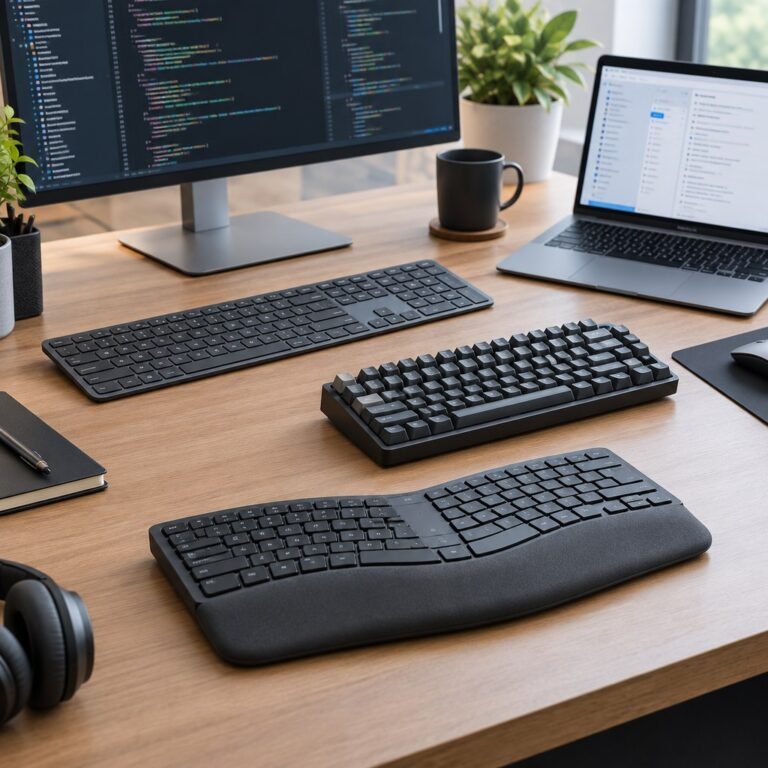
A practical starting point for productivity keyboards
Typical UK price range: £60–£190+Indicative market guide reviewed August 2026. International pricing, tax, availability and subscriptions vary by region.
Typing feel and layout matter more than gaming latency for most office users. Multi-device switching, useful shortcut layers and reliable Bluetooth can save more time than exotic switches if you work across several computers.
These are research-led starting points chosen to represent useful budgets and use cases. A product appearing here is not a claim that we have personally tested it; hands-on experience is labelled separately in detailed reviews.
Productivity Keyboards shortlist comparison
Product / service
Our shortlist role
Indicative price
Best for
Logitech MX Keys S
Best low-profile productivity
£90–£120
Office work and multi-device setups
Keychron K2 HE
Best mechanical hybrid
£100–£140
Users mixing gaming, writing and coding
Logitech MX Mechanical
Best premium mechanical office
£150–£190
Multi-device users who prefer mechanical switches
Logitech Wave Keys for Business UK 920-012333
Compact wave-layout office option
Check current UK price and delivery
UK-layout users wanting a cushioned palm rest and a narrower keyboard with number pad
Logitech ERGO K860 for Business UK 920-010351
Full-size split-layout business option
Check current UK price and delivery
UK office users wanting a split keyframe, wrist support and multi-device switching
Kensington Pro Fit Ergo Wireless UK K75401UK
Adjustable reverse-tilt split option
Check current UK price and delivery
UK-layout users comparing split keyboards with built-in wrist support
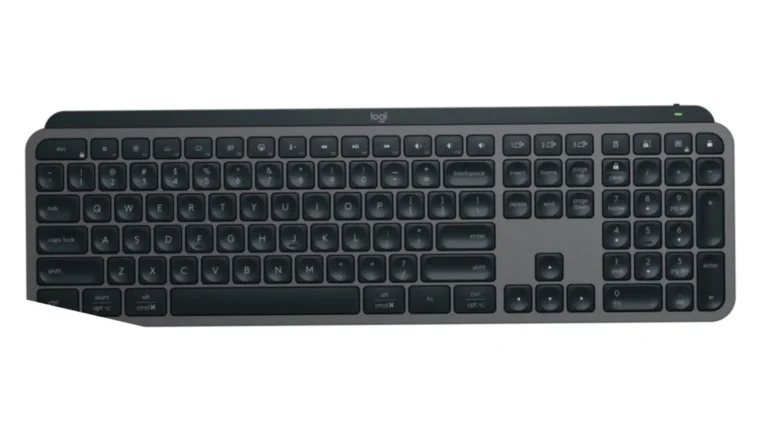
Best low-profile productivity
Product image: Logitech Newsroom / Business Wire — MX Keys S launch press image · Image courtesy of Logitech
Logitech MX Keys S
Indicative price: £90–£120
Product-specific evidence · sources checked 17 September 2026
A polished productivity keyboard with quiet keys, multi-device support and strong software integration.
Best for: Office work and multi-device setups
Potential drawback: Low-profile scissor feel is not for mechanical-keyboard fans
Research assessment
A polished productivity keyboard with quiet keys, multi-device support and strong software integration. Key compromise: Low-profile scissor feel is not for mechanical-keyboard fans.
Limitations and checks
Low-profile scissor feel is not for mechanical-keyboard fans.
Confirm layout, operating-system legends, device switching, switch feel and whether required shortcuts work without vendor software.
Sources and evidence notes (2)
This editorial synthesis does not represent a hands-on test by The Tools and Tech. Source links are references, not affiliate links. Research depth: Official product information plus product-specific independent coverage.
Price and availability can change. Check the retailer for the latest information.
Best mechanical hybrid
Product image: Back to the Office / Awin product feed · Product photo: Back to the Office via Awin. Black Special Edition ANSI keyboard shown; UK ISO keys differ. UK offer: K2H-F1-UK.
Keychron K2 HE
Indicative price: £100–£140
Product-specific evidence · sources checked 17 September 2026
A compact Hall-effect board that can serve both work and gaming while retaining a more enthusiast-style feel.
Best for: Users mixing gaming, writing and coding
Potential drawback: Compact layout sacrifices dedicated number pad
Research assessment
The K2 HE is the more balanced gaming-and-work choice: a 75% layout, Hall-effect adjustment, 2.4GHz wireless, Bluetooth and USB-C coexist with damped construction and a restrained office-friendly design. Reviewers consistently praise its smooth, quiet typing and useful web configurator. It is not simply a wireless Wooting, though: competitive polling tops out lower, there is no dedicated media dial, the case is tall, and its hot-swap compatibility is limited to Keychron-supported double-rail magnetic switches.
Reasons to consider
Good typing acoustics and build alongside adjustable Hall-effect gaming features
Three connection modes and practical multi-device support
Limitations and checks
High front height, no rotary control and no number pad
Magnetic switch compatibility is narrower than standard MX hot-swap ecosystems
Sources and evidence notes (3)
This editorial synthesis does not represent a hands-on test by The Tools and Tech. Source links are references, not affiliate links. Research depth: Official product information plus multiple product-specific independent sources.
Price and availability can change. Check the retailer for the latest information.
Best premium mechanical office
Product image: Back to the Office / Awin product feed · Product photo: Back to the Office via Awin. Full-size MX Mechanical at rear; Mini separately sold at front. ANSI keys shown; UK offer is ISO.
Logitech MX Mechanical
Indicative price: £150–£190
Category-supported evidence · sources checked 17 September 2026
A work-first mechanical keyboard built around Logitech device switching and productivity software.
Best for: Multi-device users who prefer mechanical switches
Potential drawback: Pricey and less customisable than enthusiast boards
Research assessment
A work-first mechanical keyboard built around Logitech device switching and productivity software. Key compromise: Pricey and less customisable than enthusiast boards.
Limitations and checks
Pricey and less customisable than enthusiast boards.
Confirm layout, operating-system legends, device switching, switch feel and whether required shortcuts work without vendor software.
Sources and evidence notes (2)
This editorial synthesis does not represent a hands-on test by The Tools and Tech. Source links are references, not affiliate links. Research depth: Official product information plus independent category context.
Price and availability can change. Check the retailer for the latest information.
Compact wave-layout office option
Product image: Back to the Office / Awin product feed · Product photo: Back to the Office via Awin. Graphite Wave Keys 920-012333 shown in side profile; key legends are not visible. UK offer.
Logitech Wave Keys for Business UK 920-012333
Indicative price: Check current UK price and delivery
Manufacturer specification evidence · sources checked 9 October 2026
The English UK business variant is 920-012333. Its curved layout includes a number pad, Bluetooth and an included Logi Bolt receiver, with switching between up to three devices. Check the exact UK layout rather than relying on retailer photos of an international version.
Best for: UK-layout users wanting a cushioned palm rest and a narrower keyboard with number pad
The English UK business variant is 920-012333. Its curved layout includes a number pad, Bluetooth and an included Logi Bolt receiver, with switching between up to three devices. Check the exact UK layout rather than relying on retailer photos of an international version. Reason to consider: UK-layout users wanting a cushioned palm rest and a narrower keyboard with number pad.
Reasons to consider
Compact wave-layout office option
Limitations and checks
No backlighting; advanced customisation requires supported Logi Options+ software
Research-based entry; no hands-on verdict or guaranteed comfort/performance is claimed.
Sources and evidence notes (3)
This editorial synthesis does not represent a hands-on test by The Tools and Tech. Source links are references, not affiliate links. Research depth: Official product specification and exact-model UK retailer listing; no independent performance test or hands-on verdict claimed..
Price and availability can change. Check the retailer for the latest information.
Full-size split-layout business option
Product image: Back to the Office / Awin product feed · Product photo: Back to the Office via Awin. Graphite ERGO K860 for Business 920-010351 with UK ISO keys shown.
Logitech ERGO K860 for Business UK 920-010351
Indicative price: Check current UK price and delivery
Manufacturer specification evidence · sources checked 9 October 2026
The exact English UK business SKU is 920-010351. It combines a curved split layout, number pad and palm rest with Bluetooth or Logi Bolt connectivity. Check desk width and allow time to adjust to split typing; basic input and software customisation have different operating-system requirements.
Best for: UK office users wanting a split keyframe, wrist support and multi-device switching
Potential drawback: Wide 456mm body needs desk space; Logi Bolt is not interchangeable with Unifying receivers
Research assessment
The exact English UK business SKU is 920-010351. It combines a curved split layout, number pad and palm rest with Bluetooth or Logi Bolt connectivity. Check desk width and allow time to adjust to split typing; basic input and software customisation have different operating-system requirements. Reason to consider: UK office users wanting a split keyframe, wrist support and multi-device switching.
Reasons to consider
Full-size split-layout business option
Limitations and checks
Wide 456mm body needs desk space; Logi Bolt is not interchangeable with Unifying receivers
Research-based entry; no hands-on verdict or guaranteed comfort/performance is claimed.
Sources and evidence notes (2)
This editorial synthesis does not represent a hands-on test by The Tools and Tech. Source links are references, not affiliate links. Research depth: Official product specification and exact-model UK retailer listing; no independent performance test or hands-on verdict claimed..
Price and availability can change. Check the retailer for the latest information.
Adjustable reverse-tilt split option
Kensington Pro Fit Ergo Wireless UK K75401UK
Editorial illustration — not a product photograph
Kensington Pro Fit Ergo Wireless UK K75401UK
Indicative price: Check current UK price and delivery
Manufacturer specification evidence · sources checked 9 October 2026
K75401UK identifies the UK keyboard, rather than a keyboard-and-mouse bundle or a US layout. Its split and sloped design provides adjustable reverse tilt and an integrated wrist rest. Compare its shape and desk footprint with Wave Keys and K860 before choosing.
Best for: UK-layout users comparing split keyboards with built-in wrist support
Potential drawback: Split layout needs adaptation; confirm the UK SKU and current host/software requirements
Research assessment
K75401UK identifies the UK keyboard, rather than a keyboard-and-mouse bundle or a US layout. Its split and sloped design provides adjustable reverse tilt and an integrated wrist rest. Compare its shape and desk footprint with Wave Keys and K860 before choosing. Reason to consider: UK-layout users comparing split keyboards with built-in wrist support.
Reasons to consider
Adjustable reverse-tilt split option
Limitations and checks
Split layout needs adaptation; confirm the UK SKU and current host/software requirements
Research-based entry; no hands-on verdict or guaranteed comfort/performance is claimed.
Sources and evidence notes (2)
This editorial synthesis does not represent a hands-on test by The Tools and Tech. Source links are references, not affiliate links. Research depth: Official product specification and exact-model UK retailer listing; no independent performance test or hands-on verdict claimed..
Price and availability can change. Check the retailer for the latest information.
Use the retailer or official-site button to check the latest price, availability and specifications before buying. Where we later obtain approved affiliate relationships, qualifying links may earn a commission at no extra cost to the reader.
Buying advice
What matters when choosing productivity keyboards
✓Layout and typing comfort
✓Switch feel
✓Multi-device support
✓Shortcuts and software
Our guides focus on the factors that affect real-world fit and value, not simply the longest specification list.
Common questions
Productivity Keyboards FAQ
How much should I spend on productivity keyboards?
A useful UK market guide is £60–£190+. The right spend depends on the features you will genuinely use, so compare the middle of the range before paying for premium extras.
What should I look for when buying productivity keyboards?
Prioritise Layout and typing comfort, Switch feel, Multi-device support. Check compatibility and return/warranty terms before buying, particularly when a product is part of a wider hardware ecosystem.
Are the products on this page hands-on tested?
Not necessarily. This category page is a research-led shortlist. Detailed guides clearly label any hands-on testing and distinguish it from manufacturer specifications, independent evidence and market research.
What is a good productivity keyboards option to start comparing?
Logitech MX Keys S is one of the current research starting points on this page. Compare it with the alternatives above for budget, compatibility, features and drawbacks before deciding.
Research-led comparison of current gaming keyboards from Logitech, Razer and SteelSeries, covering rapid trigger, adjustable actuation, wireless, layout and value.
Compare productivity keyboards for UK work and coding, including Logitech MX Keys S, K950, Wave Keys, MX Mechanical and Microsoft Surface Keyboard 2nd Edition.
To provide the best experiences, we use technologies like cookies to store and/or access device information. Consenting to these technologies will allow us to process data such as browsing behaviour or unique IDs on this site. Not consenting or withdrawing consent, may adversely affect certain features and functions.
Functional
Always active
The technical storage or access is strictly necessary for the legitimate purpose of enabling the use of a specific service explicitly requested by the subscriber or user, or for the sole purpose of carrying out the transmission of a communication over an electronic communications network.
Preferences
The technical storage or access is necessary for the legitimate purpose of storing preferences that are not requested by the subscriber or user.
Statistics
The technical storage or access that is used exclusively for statistical purposes.The technical storage or access that is used exclusively for anonymous statistical purposes. Without a subpoena, voluntary compliance on the part of your Internet Service Provider, or additional records from a third party, information stored or retrieved for this purpose alone cannot usually be used to identify you.
Marketing
The technical storage or access is required to create user profiles to send advertising, or to track the user on a website or across several websites for similar marketing purposes.