Best Pen Display for Digital Art

A pen display is both a monitor and an input device, so screen quality and pen behaviour matter together. This guide compares portable and studio options by pen technology, parallax, colour, ergonomics and workflow support without confusing ordinary touchscreen input with pressure-sensitive drawing tools.
The recommendations below are research-led. We compared current manufacturer information with independent category or workload testing and deliberately call out compatibility, value and limitations. No product is described as hands-on tested by The Tools and Tech unless that actually happens later.
Quick answer
At a glance
| Option | Best for | Why it stands out | Main trade-off |
|---|---|---|---|
| Wacom Movink 13 | Artists wanting a very light professional OLED pen display | Portable OLED professional: A 13.3-inch OLED pen display that focuses on portability, contrast and Wacom pen input for professional illustration and editing. | 13.3-inch workspace is compact and accessories can raise total cost |
| XPPen Artist Ultra 14 | Artists wanting a compact high-resolution AMOLED drawing display | Portable high-resolution alternative: A 14-inch 2.8K-class AMOLED pen display positioned as a portable alternative for illustration and mobile creator setups. | Driver/workflow maturity should be tested against the exact creative apps used |
| ASUS ProArt PA169CDV | Colour-critical digital art and design needing 4K, touch and Wacom EMR | 4K pen + touch workstation display: A 15.6-inch 4K IPS creative display with 10-point touch, Wacom EMR pen input and colour-focused ProArt calibration features. | Expensive and only 15.6 inches for a desk-bound premium device |
| Wacom Cintiq Pro 27 | Professional studio artists wanting a large high-end Wacom workspace | Large flagship Wacom: A flagship large-format pen display for professional studios where screen area, pen feel and workflow integration justify the spend. | Very high cost, large desk footprint and stand may be a separate consideration |
| XPPen Artist Pro 27 (Gen 2) | Creators wanting a large pen display below flagship Wacom pricing | Large alternative: A large 27-inch-class professional pen display aimed at creators who want more working area without entering Wacom flagship pricing. | Desk space, stand and long-term driver preference should be checked |
Portable OLED professional: Wacom Movink 13
Portable OLED professional

Wacom Movink 13
Indicative price: ~£500–£600
Category-supported evidence · sources checked 26 August 2026
A 13.3-inch OLED pen display that focuses on portability, contrast and Wacom pen input for professional illustration and editing.
Best for: Artists wanting a very light professional OLED pen display
Potential drawback: 13.3-inch workspace is compact and accessories can raise total cost
Research assessment
A 13.3-inch OLED pen display that focuses on portability, contrast and Wacom pen input for professional illustration and editing. Treat the price shown on the category page as an indicative UK range, not a live quote.
- Artists wanting a very light professional OLED pen display
- A 13
- 13.3-inch workspace is compact and accessories can raise total cost
- Check exact model, compatibility and current UK availability before buying
Sources and evidence notes (2)
This editorial synthesis does not represent a hands-on test by The Tools and Tech. Source links are references, not affiliate links. Research depth: Official product information plus current independent category context.
- Wacom Movink 13 official product information (opens in a new tab) (manufacturer / official)
- Current independent category/workload context (opens in a new tab) (independent category guidance)
Price and availability can change. Check the retailer for the latest information.
A 13.3-inch OLED pen display that focuses on portability, contrast and Wacom pen input for professional illustration and editing. The current category price marker is ~£500–£600. That is an indicative UK range rather than a live quote, so compare current stock and exact board/kit/capacity before deciding.
Why it fits: Artists wanting a very light professional OLED pen display. The main check is 13.3-inch workspace is compact and accessories can raise total cost. This guide is research-based; performance, acoustics, fit and reliability should not be described as first-hand experience unless The Tools and Tech later tests the exact item.
Portable high-resolution alternative: XPPen Artist Ultra 14
Portable high-resolution alternative
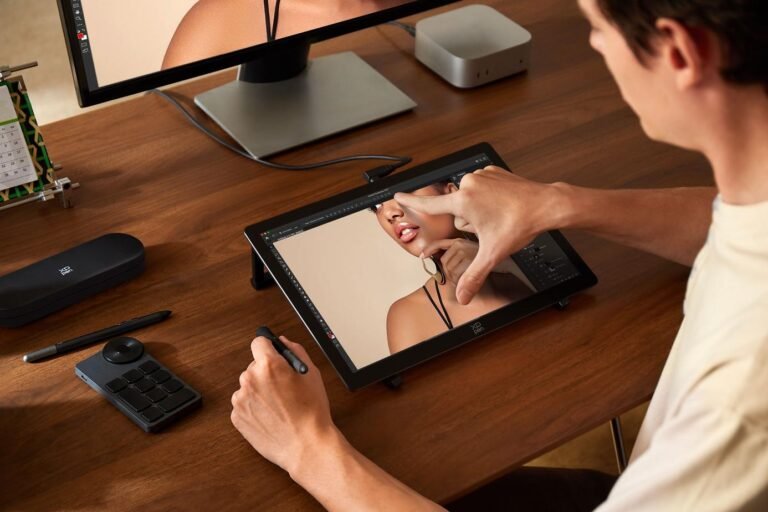
XPPen Artist Ultra 14
Indicative price: ~£550–£650
Category-supported evidence · sources checked 26 August 2026
A 14-inch 2.8K-class AMOLED pen display positioned as a portable alternative for illustration and mobile creator setups.
Best for: Artists wanting a compact high-resolution AMOLED drawing display
Potential drawback: Driver/workflow maturity should be tested against the exact creative apps used
Research assessment
A 14-inch 2.8K-class AMOLED pen display positioned as a portable alternative for illustration and mobile creator setups. Treat the price shown on the category page as an indicative UK range, not a live quote.
- Artists wanting a compact high-resolution AMOLED drawing display
- A 14-inch 2
- Driver/workflow maturity should be tested against the exact creative apps used
- Check exact model, compatibility and current UK availability before buying
Sources and evidence notes (2)
This editorial synthesis does not represent a hands-on test by The Tools and Tech. Source links are references, not affiliate links. Research depth: Official product information plus current independent category context.
- XPPen Artist Ultra 14 official product information (opens in a new tab) (manufacturer / official)
- Current independent category/workload context (opens in a new tab) (independent category guidance)
Price and availability can change. Check the retailer for the latest information.
A 14-inch 2.8K-class AMOLED pen display positioned as a portable alternative for illustration and mobile creator setups. The current category price marker is ~£550–£650. That is an indicative UK range rather than a live quote, so compare current stock and exact board/kit/capacity before deciding.
Why it fits: Artists wanting a compact high-resolution AMOLED drawing display. The main check is driver/workflow maturity should be tested against the exact creative apps used. This guide is research-based; performance, acoustics, fit and reliability should not be described as first-hand experience unless The Tools and Tech later tests the exact item.
4K pen + touch workstation display: ASUS ProArt PA169CDV
4K pen + touch workstation display
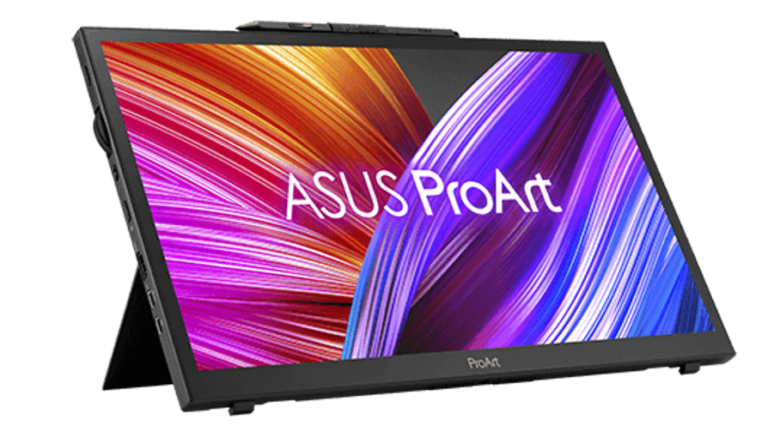
ASUS ProArt PA169CDV
Indicative price: ~£900–£1,200
Category-supported evidence · sources checked 26 August 2026
A 15.6-inch 4K IPS creative display with 10-point touch, Wacom EMR pen input and colour-focused ProArt calibration features.
Best for: Colour-critical digital art and design needing 4K, touch and Wacom EMR
Potential drawback: Expensive and only 15.6 inches for a desk-bound premium device
Research assessment
A 15.6-inch 4K IPS creative display with 10-point touch, Wacom EMR pen input and colour-focused ProArt calibration features. Treat the price shown on the category page as an indicative UK range, not a live quote.
- Colour-critical digital art and design needing 4K, touch and Wacom EMR
- A 15
- Expensive and only 15.6 inches for a desk-bound premium device
- Check exact model, compatibility and current UK availability before buying
Sources and evidence notes (2)
This editorial synthesis does not represent a hands-on test by The Tools and Tech. Source links are references, not affiliate links. Research depth: Official product information plus current independent category context.
- ASUS ProArt PA169CDV official product information (opens in a new tab) (manufacturer / official)
- Current independent category/workload context (opens in a new tab) (independent category guidance)
Price and availability can change. Check the retailer for the latest information.
A 15.6-inch 4K IPS creative display with 10-point touch, Wacom EMR pen input and colour-focused ProArt calibration features. The current category price marker is ~£900–£1,200. That is an indicative UK range rather than a live quote, so compare current stock and exact board/kit/capacity before deciding.
Why it fits: Colour-critical digital art and design needing 4K, touch and Wacom EMR. The main check is expensive and only 15.6 inches for a desk-bound premium device. This guide is research-based; performance, acoustics, fit and reliability should not be described as first-hand experience unless The Tools and Tech later tests the exact item.
Large flagship Wacom: Wacom Cintiq Pro 27
Large flagship Wacom

Wacom Cintiq Pro 27
Indicative price: ~£3,000+
Category-supported evidence · sources checked 26 August 2026
A flagship large-format pen display for professional studios where screen area, pen feel and workflow integration justify the spend.
Best for: Professional studio artists wanting a large high-end Wacom workspace
Potential drawback: Very high cost, large desk footprint and stand may be a separate consideration
Research assessment
A flagship large-format pen display for professional studios where screen area, pen feel and workflow integration justify the spend. Treat the price shown on the category page as an indicative UK range, not a live quote.
- Professional studio artists wanting a large high-end Wacom workspace
- A flagship large-format pen display for professional studios where screen area, pen feel and workflow integration justify the spend
- Very high cost, large desk footprint and stand may be a separate consideration
- Check exact model, compatibility and current UK availability before buying
Sources and evidence notes (2)
This editorial synthesis does not represent a hands-on test by The Tools and Tech. Source links are references, not affiliate links. Research depth: Official product information plus current independent category context.
- Wacom Cintiq Pro 27 official product information (opens in a new tab) (manufacturer / official)
- Current independent category/workload context (opens in a new tab) (independent category guidance)
Price and availability can change. Check the retailer for the latest information.
A flagship large-format pen display for professional studios where screen area, pen feel and workflow integration justify the spend. The current category price marker is ~£3,000+. That is an indicative UK range rather than a live quote, so compare current stock and exact board/kit/capacity before deciding.
Why it fits: Professional studio artists wanting a large high-end Wacom workspace. The main check is very high cost, large desk footprint and stand may be a separate consideration. This guide is research-based; performance, acoustics, fit and reliability should not be described as first-hand experience unless The Tools and Tech later tests the exact item.
Large alternative: XPPen Artist Pro 27 (Gen 2)
Large alternative
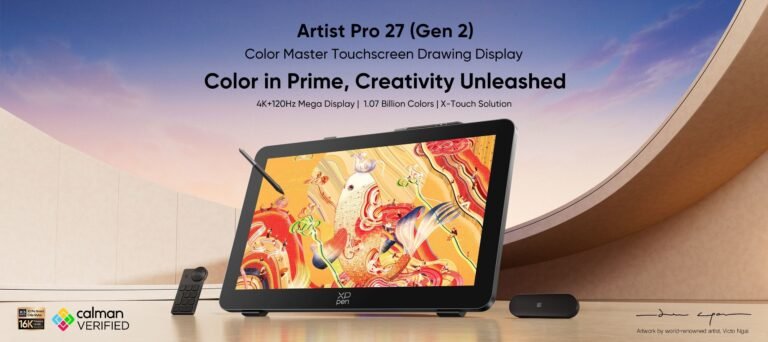
XPPen Artist Pro 27 (Gen 2)
Indicative price: ~£1,000–£1,300
Category-supported evidence · sources checked 26 August 2026
A large 27-inch-class professional pen display aimed at creators who want more working area without entering Wacom flagship pricing.
Best for: Creators wanting a large pen display below flagship Wacom pricing
Potential drawback: Desk space, stand and long-term driver preference should be checked
Research assessment
A large 27-inch-class professional pen display aimed at creators who want more working area without entering Wacom flagship pricing. Treat the price shown on the category page as an indicative UK range, not a live quote.
- Creators wanting a large pen display below flagship Wacom pricing
- A large 27-inch-class professional pen display aimed at creators who want more working area without entering Wacom flagship pricing
- Desk space, stand and long-term driver preference should be checked
- Check exact model, compatibility and current UK availability before buying
Sources and evidence notes (2)
This editorial synthesis does not represent a hands-on test by The Tools and Tech. Source links are references, not affiliate links. Research depth: Official product information plus current independent category context.
- XPPen Artist Pro 27 (Gen 2) official product information (opens in a new tab) (manufacturer / official)
- Current independent category/workload context (opens in a new tab) (independent category guidance)
Price and availability can change. Check the retailer for the latest information.
A large 27-inch-class professional pen display aimed at creators who want more working area without entering Wacom flagship pricing. The current category price marker is ~£1,000–£1,300. That is an indicative UK range rather than a live quote, so compare current stock and exact board/kit/capacity before deciding.
Why it fits: Creators wanting a large pen display below flagship Wacom pricing. The main check is desk space, stand and long-term driver preference should be checked. This guide is research-based; performance, acoustics, fit and reliability should not be described as first-hand experience unless The Tools and Tech later tests the exact item.
What to look for
Pen system
Pressure levels are only one specification. Tracking accuracy, initial activation force, tilt, cursor stability and driver behaviour determine how natural the tool feels.
Parallax and surface
A laminated screen and suitable surface reduce the visual gap and slippery feeling between pen tip and image. These are important hands-on characteristics and should not be invented from specifications.
Colour
Illustrators and photographers should check gamut, calibration and consistency. A beautiful OLED is not automatically the most accurate screen for every workflow.
Touch and shortcuts
Touch can speed navigation but some artists disable it while drawing. Shortcut remotes, dials and on-screen controls can matter more than touch alone.
How we researched this guide
We checked current Wacom, ASUS and XPPen product information and treat the recommendations as research-led until the exact displays are tested.
Check current driver support, included stand/pen/accessories, regional warranty and UK price before buying. We add first-hand pen-feel or colour judgements only after documented testing of the exact display.
Frequently asked questions
What is the difference between a touchscreen and a pen display?
A touchscreen primarily recognises finger/capacitive input. A pen display uses an active stylus system designed for drawing, usually adding pressure, tilt and more precise cursor behaviour.
Is Wacom still worth the premium?
It can be for buyers who value its pen ecosystem, support and workflow familiarity, but strong alternatives now compete on display technology, size and price. Compare the exact model rather than the brand alone.
What size pen display should I buy?
Portable 13–16-inch displays suit travel and smaller desks. 24–27-inch models offer a larger canvas but demand more desk depth, a suitable stand/arm and a much larger budget.
Primary sources reviewed
- Wacom Movink 13 official UK product information (opens in a new tab)
- ASUS ProArt PA169CDV official UK product information (opens in a new tab)
- XPPen Artist Ultra 14 official product information (opens in a new tab)
Final verdict
For digital art, treat the pen display as an input device and a monitor at the same time. The Movink 13 is compelling for portability, the ProArt PA169CDV is a specialist 4K touch-and-pen tool, and large 27-inch models are justified only when the studio workflow benefits from the physical canvas.