Accessible & Adaptive Technology
TECHNOLOGY THAT WORKS FOR YOU
Practical equipment, settings and software for physical access, neurodivergence, sensory preferences, communication and everyday support.
Accessible technology is about having more ways to do the things that matter to you. This hub includes physical disabilities, ADHD, autism, learning disabilities and learning differences, sensory impairments, mental health needs and fluctuating energy or concentration. These are distinct experiences, and a diagnosis does not tell us which product will suit someone. You can start with a task or preference without sharing a diagnosis.
Our coverage connects home, work, study, gaming and communication. We distinguish manufacturer-documented features from our editorial judgement and label hands-on experience only when it actually happened. Equipment here is not presented as treatment for ADHD, autism or a mental health condition.
Compare accessible products and free tools
Research-led shortlist · checked 27 October 2026. These 12 entries cover equipment, an accessory ecosystem, software and built-in tools. They are starting points for individual choices, not clinical endorsements or hands-on test results. Check the linked source for changing stock and prices.
Physical access · configurable mouse
Microsoft Adaptive Mouse
The mouse core can work on its own or with separately purchased Tail and Thumb Support. The support can be positioned for either hand. Its modular shape is a reason to shortlist it when a fixed shell does not fit your grip; it is not proof that it will suit every hand.
Limitations and checks: Check the full cost of the mouse and attachments. Microsoft specifies Windows configuration through Accessory Centre; companion-device support does not mean every feature can be configured on a Mac or phone.
Physical access · shortcut and switch ecosystem
Microsoft Adaptive Hub and compatible buttons
The Hub connects compatible Adaptive Buttons and offers external switch inputs, allowing a different way to trigger shortcuts. Consider it when reaching a standard keyboard or performing a sequence of keystrokes is difficult. Start with one task you want to simplify, then identify the necessary button and mounting position.
Limitations and checks: The Hub and buttons are separate purchases. This is the productivity-accessory ecosystem, not the Xbox Adaptive Controller. Microsoft’s UK collection listed the Hub as out of stock when checked; confirm supply before planning a complete setup.
Physical and sensory access · tactile identification
Surface Adaptive Kit
This kit adds tactile and visual identification aids to a compatible Surface setup. It is worth comparing when finding a key, port or opening point is the obstacle, rather than replacing a whole computer. A low-tech adjustment can be more useful than another powered device.
Limitations and checks: Check Microsoft’s exact device guidance, label placement and whether the tactile shapes are distinguishable to you. It does not turn every laptop into an accessible device or replace a screen reader.
Adaptive gaming · external buttons and triggers
Logitech G Adaptive Gaming Kit for Xbox Adaptive Controller
This kit provides a selection of buttons and triggers to position around a compatible Xbox Adaptive Controller. Compare it when the standard controller’s button spacing or trigger reach is a barrier. A configurable layout allows different movements to control different actions.
Limitations and checks: The Xbox Adaptive Controller is sold separately. Buy the Xbox version, not a similarly named kit for PlayStation Access. Logitech’s UK page showed temporary unavailability when checked; the link is a stock-check route, not a promise of immediate delivery.
Organisation and routines · visual countdown
Time Timer MOD Home Edition
A 60-minute timer with a disappearing coloured disc makes remaining time visible without opening a phone. The manufacturer specifies no ticking and an optional end alert. Consider it if you prefer a physical countdown for a chosen task or transition; try a timer you already own before buying.
Limitations and checks: The Home Edition does not include the Education Edition’s silicone case. An AA battery is required. A countdown can feel unhelpful or pressuring for some people, so choose the alert and placement together. It is not an ADHD treatment.
Sensory preferences · reusable passive earplugs
Loop Quiet 2
Quiet 2 is a silicone earplug rather than an electronic noise-cancelling headphone. The manufacturer lists a 24 dB SNR rating and four ear-tip sizes. It is a candidate for someone who wants less incoming sound without charging another device; actual reduction depends on fit.
Limitations and checks: Do not assume the laboratory rating is the reduction you will experience. Consider alarms, conversation and surroundings. Check age guidance, hygiene and opened-product returns; the Boots listing is for ages 12+. Suitability is personal, not established by an autism or ADHD label.
Reading and learning · scan-to-speech hardware
C-Pen Reader 3
Reader 3 scans printed text for spoken playback and includes dictionary and practice features. It offers a separate device for printed material, unlike a browser’s read-aloud tool. Compare it with free phone or computer options using the actual print size and page layout you need.
Limitations and checks: Scanning requires positioning and movement: check whether that is manageable for the user. Supported languages and online features vary. Do not assume exam permission; an ExamReader is a distinct product. Compare VAT-inclusive totals, and request a demonstration where possible.
Communication · paid symbol-based AAC software
Proloquo2Go
AssistiveWare’s Proloquo2Go offers configurable symbol-based communication. It is a candidate for someone who needs an alternative or supplement to speech, not an automatic purchase for everyone with a particular diagnosis. Compare vocabulary, access method, language and the support needed to personalise it.
Limitations and checks: Check the current App Store compatibility and local price. Mac is a separate app; do not assume one purchase covers every platform. Ask about trial or assessment routes and keep a communication backup. We have not evaluated this app with a user.
Vision · free visual-assistance service
Be My Eyes
Be My Eyes provides volunteer video assistance and AI image descriptions for blind and low-vision users. The free app offers a way to request help with everyday visual information without buying dedicated hardware. Use the official download routes to avoid unofficial lookalike apps.
Limitations and checks: Camera sharing can expose private documents or surroundings. AI descriptions can be wrong; do not rely on them for safety-critical decisions. Internet access and permissions matter. The free service is distinct from the paid Workplace offering sold to organisations.
Reading · built-in software alternative
Microsoft Edge Immersive Reader
Immersive Reader offers a simplified reading view, read-aloud and text preferences on supported pages in Edge. Start here if the immediate task is reading a webpage more comfortably, before paying for dedicated reading software. This is a feature guide, not a physical product.
Limitations and checks: Not every page supports the same reading view, and browser read-aloud is not a complete screen reader or a replacement for AAC. Try the particular websites and language you use.
Communication and device access · built-in features
Apple accessibility tools: Voice Control, Live Speech and Assistive Access
These are different tools: Voice Control provides another way to navigate, Live Speech speaks typed text, and Assistive Access simplifies supported device experiences. Check which function solves your task before considering replacement hardware.
Limitations and checks: Device, operating-system, language and regional support differ. Do not buy an iPhone or iPad on the assumption that every accessibility feature works on every model. Start by checking your existing device.
Workspace · hand-fit comparison
Logitech Lift and trackball alternatives
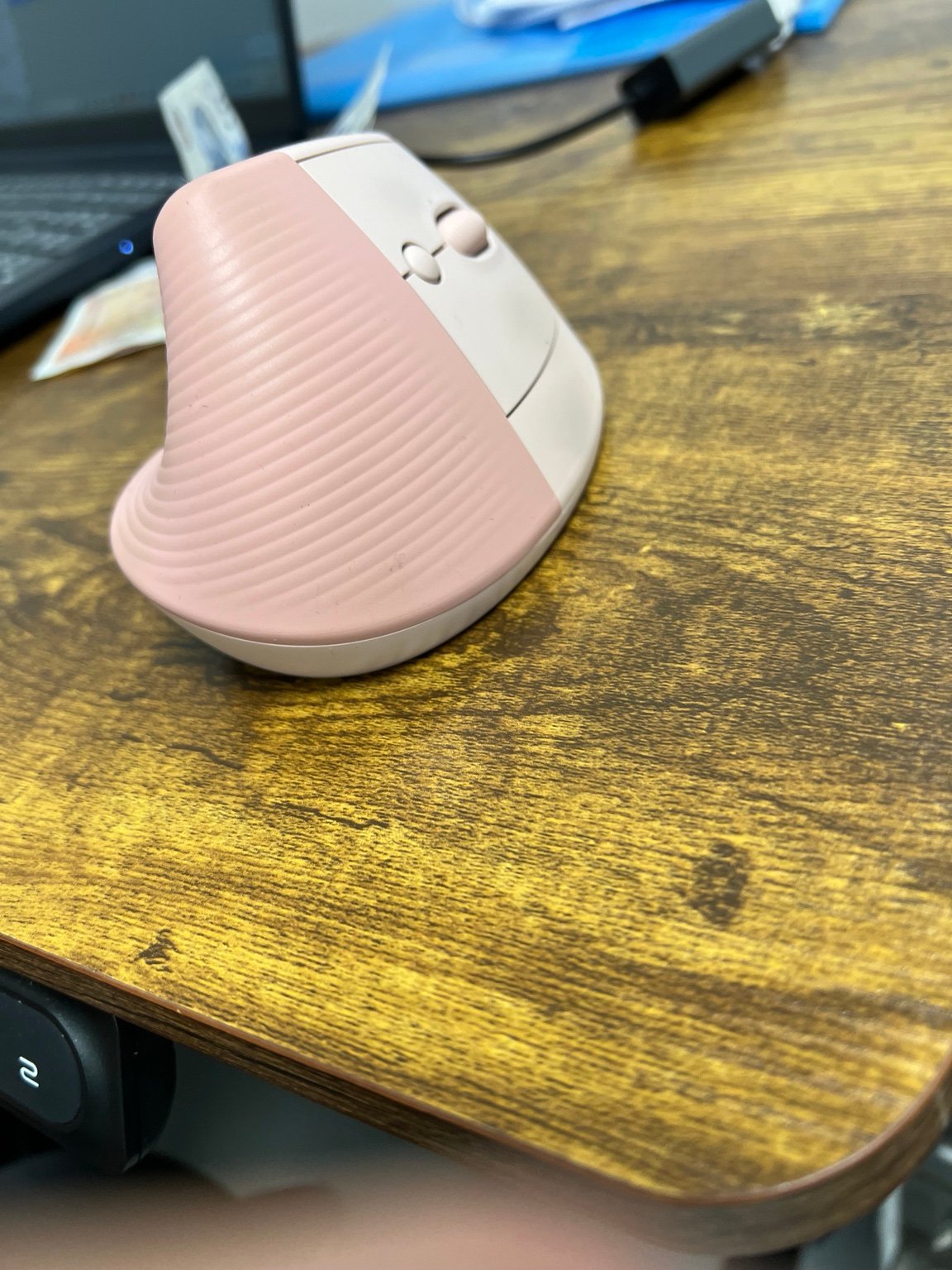
Our existing ergonomic-mouse guide compares Lift Rose with larger vertical mice and receiver-based alternatives, alongside trackball options. It includes a contributor’s reference photograph and manufacturer or retailer buying routes.
Limitations and checks: An upright mouse still needs movement across the desk; a trackball uses a different finger or thumb action. Choose by fit, handedness, reach and return conditions. The photograph’s underside label was not supplied, so it is not presented as an independently verified exact-SKU image.
Buying links and regions: manufacturer, app-store and retailer links above are ordinary links, not claims of an approved affiliate arrangement. UK offers do not establish worldwide shipping. Use the manufacturer’s regional selector or reseller directory for your country, and check tax, warranty, language and return conditions. Free tools remain part of the comparison even when they do not generate commission.
Image coverage: the mouse photograph is supplied by a contributor. Additional product images and software screenshots are withheld until the intended editorial use is clearly authorised; a publicly visible image or downloadable media file alone is not our permission record.
Physical access and dexterity
Start with the movement or action that is difficult: reaching, gripping, repeated clicking, pressing several buttons together, typing or maintaining a position. Compare the force needed, adjustment range, mounting options, hand size and whether a device can be used with either hand. A vertical mouse still needs arm movement; a trackball stays on the desk but introduces different finger or thumb movements. Neither is universally better.
Explore our ergonomic mouse and trackball guide and Workspace Equipment. For a shared setup, record each person’s settings and check that adjustments are achievable without help.
Adaptive gaming: two starting points
Xbox Adaptive Controller: a configurable hub for external switches and other inputs on supported Xbox and Windows systems. Budget for the switches, mounts and inputs your setup requires; these can be separate purchases. It is not a universal adapter for every console. Check Microsoft’s compatibility and buying routes.
PlayStation Access controller: a configurable PS5 controller with interchangeable controls and positioning options. Check the needed reach, mounting arrangement and game settings before buying. Check PlayStation’s Access controller and direct buying options. Compare with the controls and games already in your gaming setup.
ADHD, focus and organisation
Useful buying questions include: can I see how much time remains, capture a task quickly, make the next step obvious, or reduce distracting notifications? A visual timer, a simple checklist, a calendar widget or a reminder may be worth trying. Start with one specific difficulty and one tool rather than purchasing an entire productivity system.
Check how many steps setup takes, whether reminders are adjustable, whether a subscription is required and whether information can be exported. An app that needs constant maintenance may add work. We do not label a device “best for ADHD” simply because its advertising uses that phrase.
Explore software and built-in tools or plan a less distracting workspace. Compare a paid tool against the calendar, reminders and notification controls you already own.
Autism and sensory preferences
Start with the person’s own preferences: sound, light, texture, vibration, predictability and control. One person may want quieter equipment; another may prefer a consistent background sound. Consider adjustable lighting, controllable alerts, comfortable input devices and interfaces with fewer interruptions. Avoid assuming that every autistic person wants the same environment.
When comparing headphones, check fit, pressure, controls, microphone behaviour and whether environmental sounds remain available when needed. Noise cancellation and certified hearing protection are different specifications. Do not infer protection from damaging noise from an ordinary headphone’s marketing.
For connected-home equipment, check for a physical control and what still works if Wi-Fi, an account or voice control is unavailable. Browse Home Technology. AbilityNet’s first-person account of autism and technology offers useful context about individual preferences; it is not evidence that its older product examples are current recommendations.
Communication, reading and learning
Look for alternatives to typing, speaking or reading dense text: dictation, read-aloud, line focus, adjustable text presentation and augmentative and alternative communication (AAC). Reading differences such as dyslexia and learning disabilities are not interchangeable; match the tool to the person’s task and preferred method.
Microsoft Immersive Reader: a starting point for adjustable reading presentation and read-aloud in supported Microsoft products. Features vary between apps. Edge includes a reading mode on supported pages, so check your existing browser before paying for another reading service. Read Microsoft’s Edge setup instructions.
Apple accessibility tools: compare Voice Control, Live Speech and Assistive Access where supported. These serve different purposes: navigating, speaking typed text and simplifying supported device experiences. Confirm device, language and software requirements; a feature available on one Apple device is not proof of availability on another. Check Apple’s current accessibility features. A specialist AAC system deserves an individual assessment and a trial where possible.
Vision and hearing
Before buying a larger display or a new audio device, try built-in magnification, screen-reader settings, text scaling, captions and visual or vibration alerts. Check the exact app and content: captions or audio description depend on the service and programme, not just the television. Meeting captions may make mistakes with names and technical language, so they should not be treated as an exact transcript without checking.
For equipment, compare tactile controls, readable labels, adjustable display position and independent operation. For work, ask whether the full meeting workflow is accessible, including joining, sharing and reviewing notes. Explore Business Technology and the manufacturer’s documented accessibility support.
Mental wellbeing and everyday routines
Technology coverage here focuses on practical tasks: a manageable schedule, fewer unwanted interruptions, easy communication and reminders that the person controls. We will assess usability, privacy, cost and limitations rather than promise that a gadget improves a mental health condition. A wellbeing score is not a diagnosis, and an AI assistant is not a substitute for qualified care.
Prefer tools with adjustable notifications, a clear cancellation process, data deletion controls and the ability to work without intrusive monitoring. In shared households and workplaces, agree who can see reminders or activity information. Support should increase the person’s choice and autonomy.
More choices: home, planning, hearing and specialist access
Eight additional research assessments · sources checked 27 October 2026. Choose by the task you want to make easier. Some entries are ordinary consumer products; others need a supplier demonstration or individual assessment before purchase.
Alternative computer input
Pretorian n-ABLER Trackball
A large trackball offers a different way to move the pointer without sliding a mouse across the desk. It is worth comparing when small controls or a conventional mouse grip are the obstacle. The important question is whether you can comfortably operate both the ball and the required buttons in your actual position.
Limitations and checks: Ask for a demonstration with your computer and preferred hand or access method. Check operating-system support, connection type, button functions and any mounting or keyguard requirements. Do not assume that a larger ball automatically needs less effort for every user. Research assessment; not personally tested.
ADHD, organisation and routines
Tiimo visual planner
Tiimo combines a visual schedule, to-do list and focus timer. A useful trial is to plan one real morning or work session and see whether the next action is easier to find. It is an alternative to the physical Time Timer already listed, rather than a reason to buy both.
Limitations and checks: The developer offers free essential features and a trial of Pro; check the current local subscription, renewal and cancellation terms before starting. AI-generated task breakdowns need checking. Features may differ between platforms. Compare it with your existing calendar and reminders; this is planning software, not treatment.
Eye-gaze communication · assessment-led equipment
Tobii Dynavox TD Pilot
TD Pilot combines an iPad-based communication setup with dedicated eye tracking and AAC software. It belongs on the shortlist when touch or conventional pointer access is difficult, but selecting an eye-gaze system needs more than a comparison of headline specifications.
Limitations and checks: Request an individual demonstration, calibration trial, positioning assessment and complete quotation including software, mounts, support and training. The supplier’s setup instructions warn that the iPadOS built-in Eye Tracking setting can interfere with TD Pilot tracking. Follow the current device-specific guidance rather than a generic iPad tutorial. We have not assessed personal suitability.
Home alerts · visual notification
Bellman & Symfon Visit Flash Receiver
This receiver uses flashes and indicator lights for events sent by compatible Visit transmitters. It is a candidate when an audible doorbell or telephone alert is difficult to notice. Plan the whole signal path: the event detector, the receiver and where the alert can be seen.
Limitations and checks: A receiver alone does not detect every event. Confirm the required transmitter, regional model and whether the chosen version includes battery backup. Assess whether flashing light suits the person. Fire-alert integration needs the supplier’s compatible equipment and appropriate installation; this is not a standalone smoke detector.
Daily routines · alternative waking alerts
Bellman & Symfon Alarm Clock Pro
Alarm Clock Pro offers a waking arrangement using sound, flashing light and a bed shaker. Compare this with a phone alarm if the task is noticing a scheduled wake-up without relying on one type of alert.
Limitations and checks: Choose the alert method with the user and check bed-shaker placement, backup-power behaviour and included accessories. The Pro clock and the Visit Alarm Clock Receiver are different products; do not assume Pro receives every Visit transmitter. Check the exact specification if you also need household event alerts.
Hearing support · television streaming accessory
Signia TV Sound
TV Sound sends television audio to compatible Signia hearing aids. It is a useful comparison when someone wants TV audio in their aids rather than simply turning up the room speakers. Signia lists optical and analogue inputs.
Limitations and checks: Confirm the exact hearing-aid model, firmware and television audio output with your hearing-care provider before ordering. Do not substitute an older StreamLine TV listing because the name sounds similar, or assume compatibility with every Bluetooth hearing aid. The linked manufacturer page is a compatibility and supplier-enquiry route, not a verified retail-stock claim.
Home control · physical button alternative
Aqara Wireless Mini Switch
A small wireless button can provide a physical route to a lighting scene or other compatible automation, reducing reliance on a phone screen or spoken command. Aqara documents single, double and long-press actions through its hub-based system.
Limitations and checks: An Aqara hub is required. Check whether the button size and different press patterns are manageable; one clear action may be more useful than several gestures. Test the exact automation during internet loss and power loss. This is a convenience control, not a monitored personal alarm or replacement for a certified emergency system.
- Manufacturer requirements and regional buying route
- Check the exact Aqara Wireless Mini Switch at Aqara UK (affiliate buying link) — this approved Aqara UK affiliate link may earn a commission. Confirm the exact model, compatibility, UK stock and final price before buying.
Home access · curtain automation
Aqara Curtain Driver E1 — Rod Version
A motorised curtain attachment can reduce the need to reach across furniture or pull a heavy curtain by hand. The E1 Rod Version and Track Version are distinct choices. Compare this only after checking your existing curtain hardware and the practical location of the controls.
Limitations and checks: The manufacturer excludes extendable rods and specifies installation and load limits. Confirm the exact hub, number of drivers for your curtain arrangement, charging access and manual fallback. A person who cannot reach the curtain may also need help reaching a mounted driver to recharge it. Ask the seller to confirm fit before purchase.
- Rod Version specifications and regional buying route
- Check the Aqara Curtain Driver E1 Rod Version at Aqara UK (affiliate buying link) — this approved Aqara UK affiliate link may earn a commission. Confirm the exact model, compatibility, UK stock and final price before buying.
Related adaptive home-control options: presence-based lighting can be useful when reaching a wall switch is awkward, but it should be optional, adjustable and agreed with the person using the room. Our Aqara FP300, Water Leak T1 and wider sensor comparison explains how the sensor, hub, Thread/Zigbee connection and alerts fit together. These products are general-purpose automation devices, not personal alarms or clinical monitoring equipment. Choose privacy and manual control first.
Compare the complete cost: include required hubs, transmitters, switches, mounts, subscriptions and setup support. A manufacturer’s information link is labelled separately from a direct retail buying route. We have not confirmed affiliate approval or live stock for every entry. For countries outside the UK, use the manufacturer’s regional supplier and confirm local radio compatibility, warranty and support.
Privacy and choice: agree any shared schedules, remote access or household monitoring with the person using the equipment. For critical alerts, keep an appropriate tested backup; ordinary home automation and AI features are not safety guarantees. These are research assessments, not clinical recommendations or claims of hands-on testing.
Continue with Home Technology, Business Technology, Workspace Equipment or Software for related setup choices.
Accessible keyboards, switches and simpler phones
Six more researched choices with detailed buying checks in our equipment guide:
- Pretorian SimplyWorks Keyboard — large keys, optional keyguard and receiver requirements.
- Clevy Keyboard 3 — generation, layout and wired/wireless options.
- SimplyWorks Joystick — an alternative pointer-control method.
- AbleNet Jelly Bean Switch — single-switch input with a compatible interface.
- Doro Leva X10 — restricted-contact calling.
- Doro Leva E10 — a conventional keypad-phone comparison.
Before spending money
- Try existing settings first: a free change may solve the task without another device.
- Check the complete setup: operating system, platform, connectors, mounts, accessories, training and ongoing fees.
- Try and return: check demonstration access and the exact return conditions, especially for personalised equipment.
- Protect privacy: consider microphone, camera, location and sensitive personal information; collect only what the task needs.
- Check local availability: UK buying links are not evidence of worldwide delivery, funding eligibility, local support or warranty coverage.
How we choose and describe products
We prioritise clear features, meaningful limitations and independent choices. Research assessments are separate from lived-experience feedback and hands-on tests. We do not assume endorsement by a charity, clinician or community, and affiliate arrangements do not establish accessibility suitability. Manufacturer and retailer links on this page do not imply programme approval.
For independent help exploring device settings, AbilityNet’s My Computer My Way is a useful starting point. Our editorial policy and commercial disclosure explain how the site works.
Need an easier way to use this page? Our Website Accessibility & Support page explains how to report an inaccessible feature or request information in a simpler format. You can also send accessibility feedback without disclosing a diagnosis or unnecessary personal details.
Research and source links checked 27 October 2026. This is an accessibility buying and setup hub, not a medical assessment.