Best Portable Monitor for a Laptop UK (2026)

A laptop portable monitor should make a temporary workspace easier, not replace one cable problem with three new ones. The most important question is whether the laptop can send video and power through the same USB-C connection. After that, screen shape, stand stability, packed weight and the way windows are arranged have more influence on daily productivity than an isolated headline specification.
This guide focuses specifically on laptop workflows: a simple second display, a battery-assisted wireless presentation screen, a polished travel desk and a dual-panel mobile workstation. It is separate from a general portable-monitor list because laptop port support, charging and operating-system display behaviour deserve more attention.
Quick answer
Before choosing a one-cable travel setup, read our USB-C vs HDMI portable-monitor guide to confirm your laptop actually supports video over the USB-C port you plan to use.
At a glance
| Option | Best for | Why it stands out | Main trade-off |
|---|---|---|---|
| ASUS ZenScreen MB169CK | Email, documents and reference material | Simple 15.6-inch wired second screen | Host laptop needs compatible video output |
| ViewSonic VG1656N | Presentations and flexible business travel | Wireless casting plus battery and 16:10 workspace | Wireless mode can add latency |
| espresso Display 15 | A repeatable premium travel desk | Stand-led design and straightforward USB-C workflow | Complete system costs more |
| ASUS ZenScreen Duo OLED MQ149CD | Coding and multi-window mobile work | Two additional 14-inch OLED work areas | More bulk, power demand and setup complexity |
Best for most laptop users: ASUS ZenScreen MB169CK
Best value starting point
ASUS ZenScreen MB169CK
Indicative price: Budget-to-mid-range portable display
Category-supported evidence · sources checked 17 September 2026
A straightforward Full HD portable display with dual USB-C connectivity and a flexible kickstand for laptop-bag use.
Best for: A simple 16-inch USB-C second screen
Potential drawback: Basic productivity focus without touch or a built-in battery
Research assessment
A straightforward Full HD portable display with dual USB-C connectivity and a flexible kickstand for laptop-bag use. Key compromise: Basic productivity focus without touch or a built-in battery.
- Basic productivity focus without touch or a built-in battery.
- Check brightness, colour, stand stability, cable requirements, touch support and whether the laptop can supply video and power together.
Sources and evidence notes (2)
This editorial synthesis does not represent a hands-on test by The Tools and Tech. Source links are references, not affiliate links. Research depth: Official product information plus independent category context.
- ASUS official product catalogue (opens in a new tab) (manufacturer or official source)
- Tom's Hardware portable-monitor guide (opens in a new tab) (independent category context)
Price and availability can change. Check the retailer for the latest information.
The MB169CK represents the sensible default: a 15.6-inch 1920 x 1080 IPS display with dual USB-C connections and a flexible kickstand. It gives a laptop room for a document, browser, communication window or timeline without requiring the user to learn a wireless display system. A conventional resolution can also reduce scaling inconsistencies across Windows, macOS and Linux compared with unusually dense small panels.
Confirm that the chosen laptop port supports DisplayPort over USB-C. On machines with several identical-looking USB-C sockets, only one may carry video. If the laptop cannot supply sufficient power, a separate power connection may be necessary. Think about which side the cable exits, because a cable crossing behind the keyboard can undermine an otherwise tidy setup.
Best for client meetings: ViewSonic VG1656N
Best wireless work option
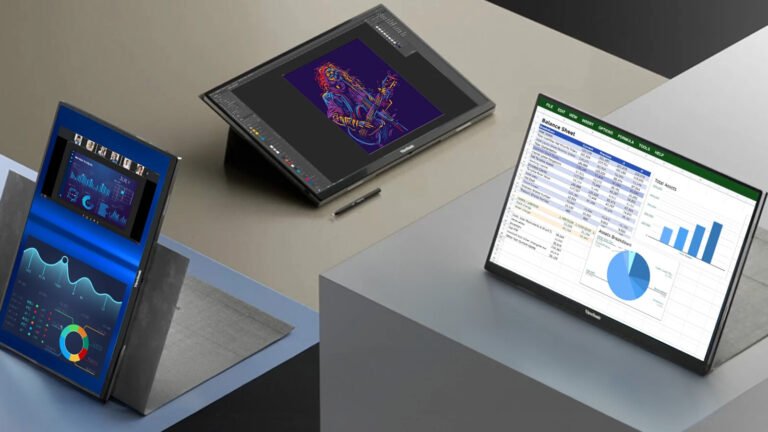
ViewSonic VG1656N
Indicative price: Premium business-portable tier
Product-specific evidence · sources checked 17 September 2026
A 16-inch 16:10 business monitor combining USB-C with wireless display support and its own battery.
Best for: Wireless presenting and mobile work with a built-in battery
Potential drawback: Wireless display behaviour and latency depend on the connected device and environment
Research assessment
A 16-inch 16:10 business monitor combining USB-C with wireless display support and its own battery. Key compromise: Wireless display behaviour and latency depend on the connected device and environment.
- Wireless display behaviour and latency depend on the connected device and environment.
- Check brightness, colour, stand stability, cable requirements, touch support and whether the laptop can supply video and power together.
Sources and evidence notes (2)
This editorial synthesis does not represent a hands-on test by The Tools and Tech. Source links are references, not affiliate links. Research depth: Official product information plus product-specific independent coverage.
- ViewSonic VG1656N official product or service information (opens in a new tab) (manufacturer or official source)
- PCWorld ViewSonic VG1656N review (opens in a new tab) (independent review or reporting)
Price and availability can change. Check the retailer for the latest information.
ViewSonic’s 16-inch 1920 x 1200 design adds useful vertical space for spreadsheets, documents and dashboards. Its built-in battery and wireless casting can help in meeting rooms where the nearest socket or cable path is inconvenient. Wired USB-C remains available for a more predictable desktop connection, making this a flexible business option rather than a wireless-only experiment.
A wireless presentation depends on compatible software, network conditions and the organisation’s security policy. It may not suit colour-critical work, fast video or an environment that blocks discovery protocols. The built-in battery also adds weight and has a finite runtime. Use those features when they remove friction; do not pay for them if the monitor will always sit beside one laptop with a cable.
Best premium travel-desk system: espresso Display 15
Best premium productivity design
espresso Display 15
Indicative price: Premium portable-monitor tier
Product-specific evidence · sources checked 17 September 2026
A slim 15-inch portable monitor built around a magnetic stand system and simple USB-C productivity workflow.
Best for: A polished stand system and lightweight second-screen workflow
Potential drawback: Costs more than many basic USB-C displays
Research assessment
A slim 15-inch portable monitor built around a magnetic stand system and simple USB-C productivity workflow. Key compromise: Costs more than many basic USB-C displays.
- Costs more than many basic USB-C displays.
- Check brightness, colour, stand stability, cable requirements, touch support and whether the laptop can supply video and power together.
Sources and evidence notes (2)
This editorial synthesis does not represent a hands-on test by The Tools and Tech. Source links are references, not affiliate links. Research depth: Official product information plus product-specific independent coverage.
- espresso Display 15 official product or service information (opens in a new tab) (manufacturer or official source)
- Tom's Hardware espresso Display 15 review (opens in a new tab) (independent review or reporting)
Price and availability can change. Check the retailer for the latest information.
A frequent hybrid worker may care more about setup time than the lowest purchase price. The espresso system is designed around a slim display and magnetic stand options that create a more conventional raised second-screen position. That can be easier to align with a laptop on a stand, particularly when an external keyboard and mouse already form part of the travel kit.
Work out the full packed system before deciding. A monitor, stand, laptop riser, charger, keyboard and cables can turn a light idea into a substantial bag. Check current accessory compatibility and whether touch is supported on the operating system you use. The premium makes sense when the display is set up many times each week, not when it leaves the drawer twice a year.
Best for maximum mobile workspace: ASUS ZenScreen Duo OLED MQ149CD
Best dual-screen concept

ASUS ZenScreen Duo OLED MQ149CD
Indicative price: High-end specialist portable display
Product-specific evidence · sources checked 17 September 2026
A foldable dual-OLED portable monitor designed to provide two additional 14-inch work surfaces from one unit.
Best for: Mobile multitasking, coding and compact presentations
Potential drawback: Expensive and heavier than a single conventional portable panel
Research assessment
A foldable dual-OLED portable monitor designed to provide two additional 14-inch work surfaces from one unit. Key compromise: Expensive and heavier than a single conventional portable panel.
- Expensive and heavier than a single conventional portable panel.
- Check brightness, colour, stand stability, cable requirements, touch support and whether the laptop can supply video and power together.
Sources and evidence notes (2)
This editorial synthesis does not represent a hands-on test by The Tools and Tech. Source links are references, not affiliate links. Research depth: Official product information plus product-specific independent coverage.
- ASUS ZenScreen Duo OLED MQ149CD product information (opens in a new tab) (manufacturer or official source)
- Tom's Hardware ZenScreen Duo OLED review (opens in a new tab) (independent review or reporting)
Price and availability can change. Check the retailer for the latest information.
The MQ149CD creates two 14-inch 1920 x 1200 OLED displays in a folding chassis. A developer could place code on the laptop, documentation on one panel and logs on the other; a producer could separate a call, notes and project board. This can reproduce part of a three-screen desk in a hotel or temporary office without packing three independent stands.
That benefit is workload-specific. Multiple displays use more power, require more graphics bandwidth and can complicate window placement after disconnection. Verify whether the laptop and selected cable arrangement expose both panels as expected. OLED contrast is attractive, but business users should still use reasonable screen-saver and static-interface practices.
Match the monitor to the laptop you already own
Windows laptops may label video-capable USB-C ports with DisplayPort or Thunderbolt symbols, but labels are not perfectly consistent. Apple notebooks support external displays according to the exact chip and model, with limits that can differ even inside one family. Chromebooks and Linux systems also vary in display, touch and rotation support. Read the computer’s technical manual and support pages before assuming a monitor feature will work.
If the laptop charger uses the same port, decide whether the display supports useful power pass-through or whether a dock is required. Check the charger’s wattage and the monitor’s power needs. A single-cable demonstration on a product page may use a host that supplies more power than a thin ultraportable can sustain on battery.
Laptop portable-monitor buying checklist
Port and cable
Confirm video capability, not merely the USB-C connector shape. Use a cable rated for the required video and power mode; a charge-only cable can look identical and still produce no picture.
Screen shape
A 16:10 panel offers more vertical room for documents and code, while 16:9 can align naturally with common video and many laptops. Matching the laptop’s scaling and colour does more for comfort than chasing maximum resolution.
Physical workflow
Decide whether the monitor sits beside the laptop, above it or in portrait orientation. Check stand angles and cable clearance in that real layout, including the small tables often found in hotels and shared offices.
Battery impact
A bus-powered display draws from the laptop. For long sessions, connect the laptop charger or power the monitor separately when supported. Battery-equipped monitors shift, rather than eliminate, the need to recharge.
How we researched this guide
The shortlist was built from official product specifications and laptop-use cases. We checked display dimensions, connection types, aspect ratios, battery or wireless claims and stand concepts, while avoiding a made-up universal performance score. Availability and included cables can differ across countries.
We have not independently tested colour accuracy, brightness, wireless latency or battery life. The article therefore describes intended roles and verified specifications, not laboratory rankings. An owner should update the guide if hands-on results or new model revisions become available.
Frequently asked questions
Why does my laptop not detect a USB-C monitor?
The port or cable may not support video, the monitor may need separate power, or display settings may need adjustment. Check both manuals and try the supplied full-featured cable.
Will a portable monitor drain my laptop battery?
A bus-powered monitor consumes laptop power, so runtime will usually fall. Brightness, panel type and workload affect how much. Use mains power for long sessions when practical.
Is 1080p enough for a portable monitor?
For many 14-to-16-inch productivity screens, Full HD or 1920 x 1200 can provide a useful balance of sharpness, scaling and power demand. Higher resolution is not always more comfortable.
Can a laptop run two portable monitors?
Sometimes. The answer depends on the laptop's graphics-output limits, ports, dock and the monitors' connection method. Check the exact laptop model and operating-system support.
Primary sources reviewed
- ASUS portable monitor catalogue (opens in a new tab)
- ASUS ZenScreen Duo OLED MQ149CD technical specifications (opens in a new tab)
- ViewSonic VG1656N official product page (opens in a new tab)
- espresso Display 15 product information (opens in a new tab)
Final verdict
The ASUS MB169CK is the best starting point for a straightforward compatible laptop. The ViewSonic adds useful presentation flexibility, espresso offers a more refined repeatable desk, and the ASUS Duo is a specialised multi-screen tool. Buy after verifying the laptop’s exact video outputs and the complete packed workflow; those two checks prevent more disappointment than choosing by panel specification alone.