
XR Accessories & Spatial Computing

VR, AR and spatial-computing accessories compared for exact headset support, comfort, input, tracking and play-space safety.

Quick buying guide

A practical starting point for xr accessories & spatial computing

Typical UK price range: About £50–£500+Indicative market guide reviewed August 2026. International pricing, tax, availability and subscriptions vary by region.

Solve a specific limitation—comfort, battery, tracking, input or source compatibility. Verify the exact headset generation, operating system, supported apps, required ports, play-space safety and whether the accessory still works after platform updates.

Common search themes:best VR accessoriesspatial computing accessoriesXREAL Beam ProVR stylus tracker
Products worth comparing

Shortlist at a glance

These are research-led starting points chosen to represent useful budgets and use cases. A product appearing here is not a claim that we have personally tested it; hands-on experience is labelled separately in detailed reviews.

XR Accessories & Spatial Computing shortlist comparison
Product / serviceOur shortlist roleIndicative priceBest for
XREAL Beam ProBest companion device for XREAL glassesAbout £180–£250Running spatial Android apps and media without tying up a phone
Logitech MX InkBest precision stylus for supported mixed realityAbout £130Drawing and 3D creation on supported Quest headsets
PlayStation VR2 PC AdapterBest official PS VR2-to-PC bridgeAbout £50 plus required cables/accessoriesPS VR2 owners adding compatible SteamVR PC use
VIVE Ultimate TrackerBest camera-based body and object trackingAbout £200 per tracker or bundle pricingCreators and VR users needing tracker placement without base stations

Best companion device for XREAL glasses
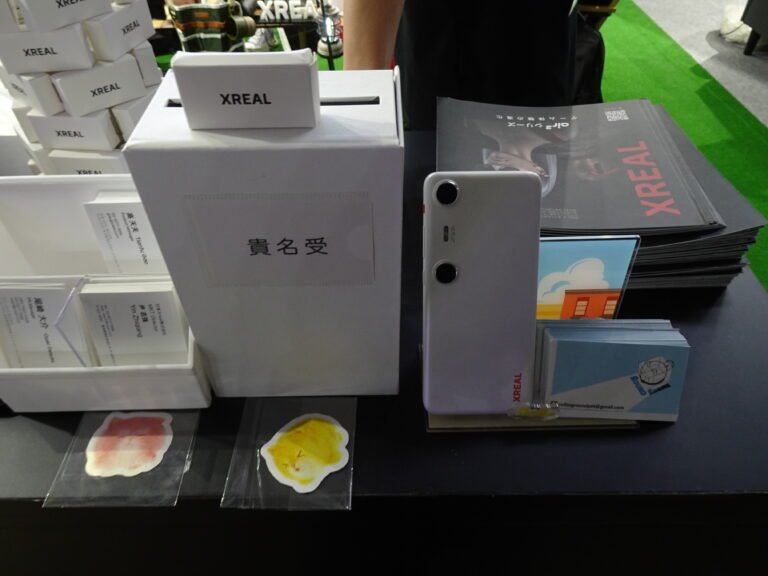
XREAL Beam Pro

Indicative price: About £180–£250

Product-specific evidence · sources checked 28 August 2026

Beam Pro is an Android-based companion device with dual cameras and spatial-display controls for supported XREAL glasses.

Best for: Running spatial Android apps and media without tying up a phone

Potential drawback: Value is narrow outside compatible XREAL display glasses

Research assessment

Beam Pro is an Android-based companion device with dual cameras and spatial-display controls for supported XREAL glasses. It is most relevant for running spatial android apps and media without tying up a phone. The strongest evidence-led reasons to consider it are dedicated device preserves phone battery and reduces cable juggling and spatial camera and android app support broaden glasses use. Buyers should still account for compatibility and app behaviour depend on the exact glasses and firmware and it is not a standalone opaque vr headset or general tablet replacement.

Reasons to consider
  • Dedicated device preserves phone battery and reduces cable juggling
  • Spatial camera and Android app support broaden glasses use
Limitations and checks
  • Compatibility and app behaviour depend on the exact glasses and firmware
  • It is not a standalone opaque VR headset or general tablet replacement
Sources and evidence notes (2)

This editorial synthesis does not represent a hands-on test by The Tools and Tech. Source links are references, not affiliate links. Research depth: Product-specific evidence; exact official information plus separately labelled external evidence or category context.

  1. XREAL Beam Pro official information (opens in a new tab) (manufacturer or official provider information)
  2. Engadget VR accessories guide (opens in a new tab) (independent category testing)

Price and availability can change. Check the retailer for the latest information.
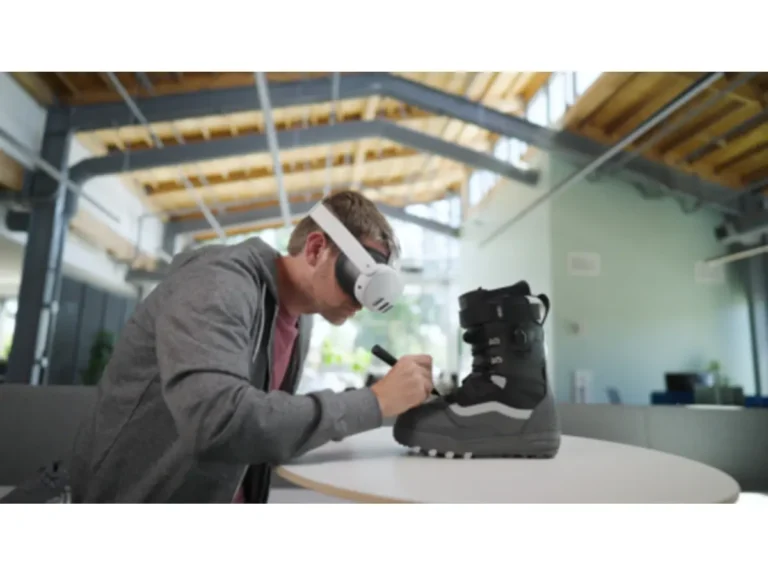
Best precision stylus for supported mixed reality

Logitech MX Ink

Indicative price: About £130

Product-specific evidence · sources checked 28 August 2026

MX Ink is a tracked stylus designed for supported Meta Quest creative and mixed-reality applications.

Best for: Drawing and 3D creation on supported Quest headsets

Potential drawback: Small software and headset compatibility list limits value

Research assessment

MX Ink is a tracked stylus designed for supported Meta Quest creative and mixed-reality applications. It is most relevant for drawing and 3d creation on supported quest headsets. The strongest evidence-led reasons to consider it are pen form is more natural than a game controller for drawing and pressure and button input support precision creative workflows. Buyers should still account for only worthwhile with confirmed compatible headset and applications and tracked input still needs calibration, space and app-specific support.

Reasons to consider
  • Pen form is more natural than a game controller for drawing
  • Pressure and button input support precision creative workflows
Limitations and checks
  • Only worthwhile with confirmed compatible headset and applications
  • Tracked input still needs calibration, space and app-specific support
Sources and evidence notes (2)

This editorial synthesis does not represent a hands-on test by The Tools and Tech. Source links are references, not affiliate links. Research depth: Product-specific evidence; exact official information plus separately labelled external evidence or category context.

  1. Logitech MX Ink official information (opens in a new tab) (manufacturer or official provider information)
  2. Engadget VR accessories guide (opens in a new tab) (independent category testing)

Price and availability can change. Check the retailer for the latest information.

Best official PS VR2-to-PC bridge

PlayStation VR2 PC Adapter

Indicative price: About £50 plus required cables/accessories

Product-specific evidence · sources checked 28 August 2026

Sony’s adapter connects PlayStation VR2 to a compatible Windows gaming PC for supported SteamVR content.

Best for: PS VR2 owners adding compatible SteamVR PC use

Potential drawback: Some PlayStation headset features are unavailable on PC

Research assessment

Sony’s adapter connects PlayStation VR2 to a compatible Windows gaming PC for supported SteamVR content. It is most relevant for ps vr2 owners adding compatible steamvr pc use. The strongest evidence-led reasons to consider it are extends an existing ps vr2 headset into pc vr and official bridge is safer than improvised connection methods. Buyers should still account for requires a capable pc, displayport cable and compatible bluetooth and hdr, headset feedback and other console features may not carry over.

Reasons to consider
  • Extends an existing PS VR2 headset into PC VR
  • Official bridge is safer than improvised connection methods
Limitations and checks
  • Requires a capable PC, DisplayPort cable and compatible Bluetooth
  • HDR, headset feedback and other console features may not carry over
Sources and evidence notes (2)

This editorial synthesis does not represent a hands-on test by The Tools and Tech. Source links are references, not affiliate links. Research depth: Product-specific evidence; exact official information plus separately labelled external evidence or category context.

  1. PlayStation VR2 PC Adapter official information (opens in a new tab) (manufacturer or official provider information)
  2. Engadget VR accessories guide (opens in a new tab) (independent category testing)

Price and availability can change. Check the retailer for the latest information.

Best camera-based body and object tracking

VIVE Ultimate Tracker

Indicative price: About £200 per tracker or bundle pricing

Product-specific evidence · sources checked 28 August 2026

VIVE Ultimate Tracker uses onboard cameras for self-tracking on supported PC VR and standalone workflows.

Best for: Creators and VR users needing tracker placement without base stations

Potential drawback: Multiple trackers, straps and supported apps make a complete setup costly

Research assessment

VIVE Ultimate Tracker uses onboard cameras for self-tracking on supported PC VR and standalone workflows. It is most relevant for creators and vr users needing tracker placement without base stations. The strongest evidence-led reasons to consider it are avoids external base stations in supported configurations and can track body points or real objects for specialist experiences. Buyers should still account for compatibility, number of trackers and calibration vary by application and battery charging, attachment and occlusion add session setup.

Reasons to consider
  • Avoids external base stations in supported configurations
  • Can track body points or real objects for specialist experiences
Limitations and checks
  • Compatibility, number of trackers and calibration vary by application
  • Battery charging, attachment and occlusion add session setup
Sources and evidence notes (2)

This editorial synthesis does not represent a hands-on test by The Tools and Tech. Source links are references, not affiliate links. Research depth: Product-specific evidence; exact official information plus separately labelled external evidence or category context.

  1. VIVE Ultimate Tracker official information (opens in a new tab) (manufacturer or official provider information)
  2. Engadget VR accessories guide (opens in a new tab) (independent category testing)

Price and availability can change. Check the retailer for the latest information.

Use the retailer or official-site button to check the latest price, availability and specifications before buying. Where we later obtain approved affiliate relationships, qualifying links may earn a commission at no extra cost to the reader.

Buying advice

What matters when choosing xr accessories & spatial computing

Exact headset and app compatibility
Comfort and balance
Tracking, input and battery
Play-space safety and update support

Our guides focus on the factors that affect real-world fit and value, not simply the longest specification list.

Common questions

XR Accessories & Spatial Computing FAQ

How much should I spend on xr accessories & spatial computing?

A useful UK market guide is About £50–£500+. The right spend depends on the features you will genuinely use, so compare the middle of the range before paying for premium extras.

What should I look for when buying xr accessories & spatial computing?

Prioritise Exact headset and app compatibility, Comfort and balance, Tracking, input and battery. Check compatibility and return/warranty terms before buying, particularly when a product is part of a wider hardware ecosystem.

Are the products on this page hands-on tested?

Not necessarily. This category page is a research-led shortlist. Detailed guides clearly label any hands-on testing and distinguish it from manufacturer specifications, independent evidence and market research.

What is a good xr accessories & spatial computing option to start comparing?

XREAL Beam Pro is one of the current research starting points on this page. Compare it with the alternatives above for budget, compatibility, features and drawbacks before deciding.

Research-ledEvidence and decision criteria come before affiliate links.
Clear testing labelsWe identify hands-on experience instead of implying it.
Editorial independenceCommercial relationships do not buy a recommendation.

Review methodology · How we make money · Work with us

The Tools and Tech
Logo